talos-argocd-proxmox
A GitOps Kubernetes homelab on Talos Linux with self-managing ArgoCD. ApplicationSets discover app directories. Per-PVC Kopiur resources declare backup and restore behavior. After the operator rebuilds Talos and seeds Argo, protected volumes restore automatically from the off-cluster repository.
Source:
mitchross/talos-argocd-proxmox· This site rendersdocs/from that repo.
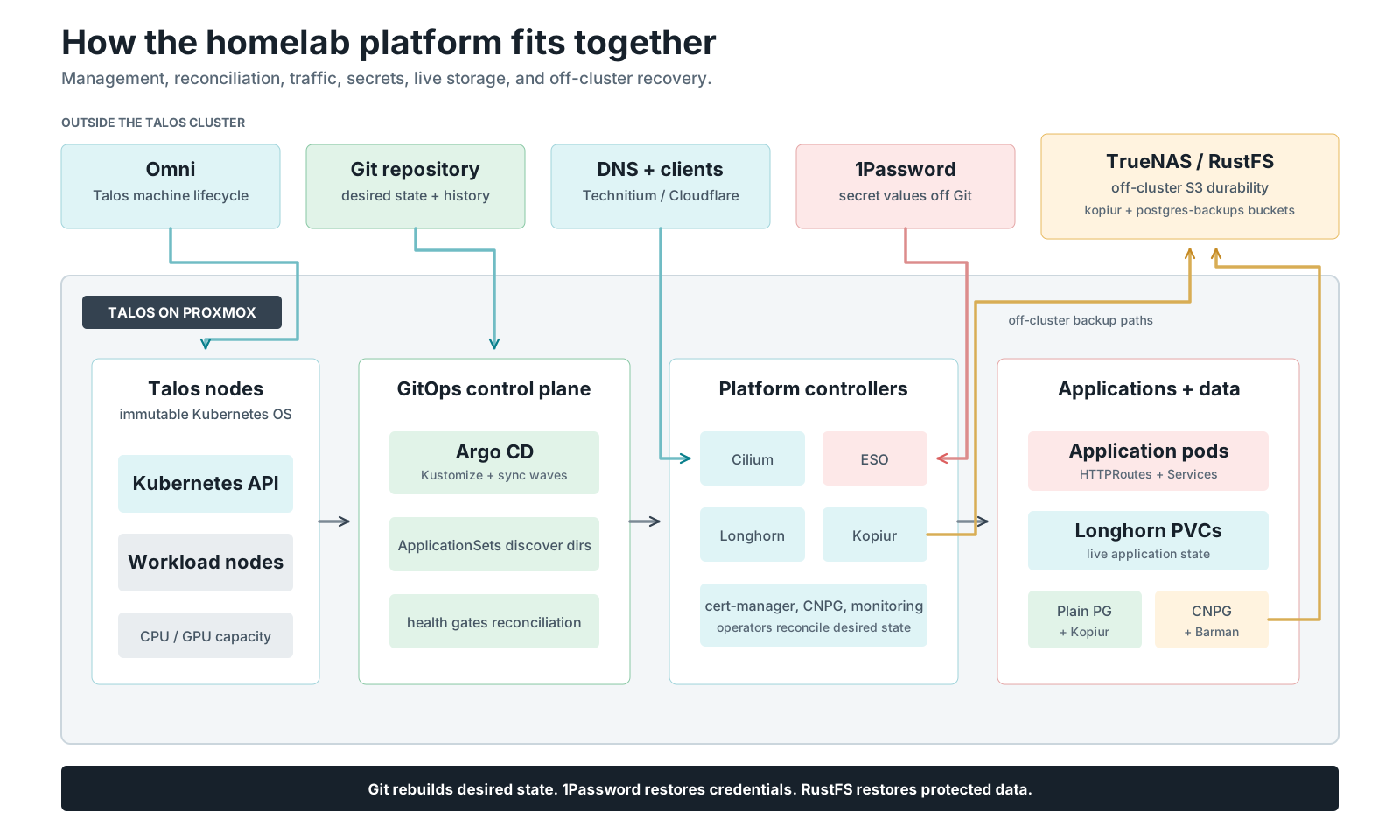
Git reconstructs desired state, 1Password reconstructs credentials, and RustFS reconstructs protected data. Open the full-size platform map.
The point
The whole cluster can be destroyed and rebuilt with every protected volume restored automatically from the off-cluster Kopia repository — no manual storage steps. See disaster recovery.
Stack
- OS: Talos Linux on Proxmox VMs, provisioned via Omni / Sidero
- CNI: Cilium with Gateway API + LoadBalancer
- GitOps: ArgoCD (self-managing) + ApplicationSets for auto-discovery
- Storage: Longhorn V1, mostly one replica despite multiple physical hosts; Temporal Postgres uses the wired two-replica class. NAS provides bulk files and off-cluster backups. Failure domains and disk inventory.
- Backup: kopiur (Kopia-native) → RustFS S3, per-PVC
SnapshotPolicy/Restorewith restore-before-bind - Database: plain Postgres Deployments backed up by kopiur — hourly snapshots, restore-before-bind (CNPG retired 2026-08-13)
- Secrets: 1Password Connect + External Secrets Operator
- Observability: kube-prometheus-stack, Loki, Tempo, OpenTelemetry
- AI: the production backend serves official
qwen3.8-27bFP8 through vLLM on both RTX 3090s; llama.cpp is retained for rollback. The model catalog owns the current backend settings; use the scale-swap runbook to change the card owner.
Documentation
Explore the lab → Click through the machines, IPs, disks, VMs and what depends on each host. Includes the proposed jobs for each machine.
Start with the hardware, disk placement and GitOps review for the engineering recommendation, proposed workload pools and disk move priorities. Those proposals are explicitly separate from deployed state.
The September 5 architecture audit and dated repository/host inventory record verified findings, proposed fixes, and current-state differences that still need reconciliation.
Every page follows the documentation reader contract: state the current posture, explain unfamiliar choices, provide verifiable steps, and include failure/rollback guidance for risky operations.
-
📖 The easy guide — share this one
The whole system from zero: GitOps → sync waves → Kustomize components → kopiur → restore-before-bind. Real YAML, an adoption ladder for "I just want to try kopiur", and the colleague FAQ.
-
💾 kopiur backup architecture — the one doc
The pieces, the component pattern, backup + restore flow diagrams, and the 6-step add-a-backup checklist.
-
☠️ Disaster recovery — the runbook
Destroy → rebuild → restore: pre-nuke checklist, restore-wave expectations, and the restore canary.
-
🗄️ Storage architecture — operator's reference
Design decisions, who-provides-what, day-2 operations (enable / exempt / drill), troubleshooting, and the honest limitations.
💾 More storage & backups
Backups are kopiur (Kopia-native operator).
- kopiur-playground.md — 🕹️ interactive, in-browser simulation of backup + restore-before-bind: delete a PVC, take S3 offline, nuke the cluster, watch what happens.
- domains/storage/kopiur-mover-permissions.md — why the backup mover runs as the data owner (the #1 gotcha), plain English + technical.
- backup-repository-setup.md — the one-time backend
setup: RustFS S3 bucket, credentials, the kopiur
ClusterRepository.
🗃️ Domains
- Databases: Run Postgres here — plain-English operator guide · Plain Postgres pattern & CNPG retirement
- GitOps / ArgoCD: argocd · entrypoints & waves
- Enterprise multi-cluster planning: roadmap · concrete fleet PRD
- Networking: topology · Dell Proxmox Talos worker · policy · Technitium
vanillax.memigration - Storage: Talos SELinux audit remediation · move a PVC to another StorageClass · kopia maintenance · RWO/RWX model & sizing · RustFS credentials · future: tiered storage
- Observability: radar-ng
- Scheduling: VPA policy ownership and topology
- Power: wall-plug metering, cost model and the power-off lockout
- Apps: Self-hosting PostHog on Kubernetes — the full recipe (topology, single-node ClickHouse, routing, upgrade checklist), portable to any cluster
- AI / GPU: model catalog · one vs two 3090s · 3090 LLM optimization · pi agent local-dev guide
Adopting any of this
This is one operator's homelab, not a product. The patterns are portable — the label-driven backup contract, the off-cluster repository, the restore-canary idea, the sync-wave bootstrap — but the image tags, hostnames, and 1Password item names are not. Start with storage-architecture.md.