CNPG (CloudNativePG), explained for homelabbers
Companion to disaster-recovery.md (the technical
runbook). This doc explains what's actually happening, why it works, and
what's a Git change vs. a kubectl command vs. a feature flag.
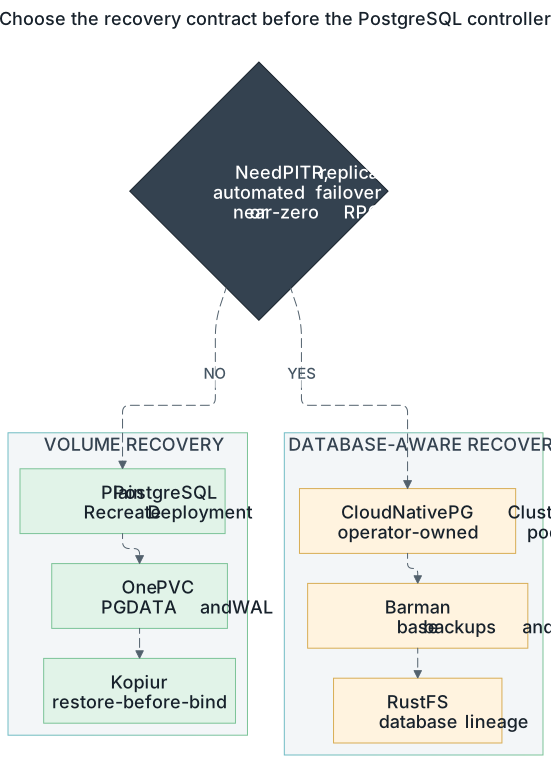
This page explains the capability-first CNPG side. The staged exit ramp uses the simpler path only where its RPO and lack of failover are acceptable. Open the full-size PostgreSQL decision diagram.
Read this when:
- You're standing up your first Postgres cluster on Kubernetes
- You're staring at a CNPG
ClusterCR and wondering "where's the backup config and why are there two overlays" - You need to do a real disaster recovery and want to understand each step BEFORE you type
kubectl delete cluster
TL;DR
Two layers of database state, two backup paths, never confuse them:
| Thing | Backed up by | Lives on |
|---|---|---|
| Postgres data (the actual database content — tables, rows, WAL) | Barman Cloud → S3 | Cluster CR + PVCs |
| App-side stuff (ExternalSecret, ScheduledBackup, Cluster YAML) | Git | The repo |
Disaster recovery uses Barman to restore Postgres data into a fresh PVC. kopiur (the PVC-backup system) has nothing to do with this. The two backup systems run side-by-side and never touch each other. PVC-level kopia backups would corrupt a running Postgres mid-snapshot — that's why CNPG PVCs carry no kopiur backup stub.
The pieces in plain English
┌─────────────────────────────────────────────────────────────────┐
│ YOUR APP NAMESPACE                     YOUR DATABASE NAMESPACE  │
│  (e.g. temporal/, immich/)              (e.g. cloudnative-pg/)  │
│                                                                 │
│   ┌──────────────────┐                  ┌────────────────────┐  │
│   │  app pods        │   psql           │  Cluster CR        │  │
│   │  (frontend,      │ ───────────────▶ │  (1 primary +      │  │
│   │   workers, etc)  │                  │   optionally       │  │
│   └──────────────────┘                  │   replicas)        │  │
│                                         │                    │  │
│                                         │  Barman plugin     │  │
│                                         │   ↓ continuous WAL │  │
│                                         │   ↓ daily base     │  │
│                                         └────────────────────┘  │
│                                                  │              │
│                                                  ▼              │
│                                   ┌────────────────────────┐    │
│                                   │  RustFS / S3 bucket    │    │
│                                   │  postgres-backups/     │    │
│                                   │   cnpg/<app>/          │    │
│                                   │     <app>-database-vN/ │    │
│                                   │       base/    ← full  │    │
│                                   │       wals/    ← WAL   │    │
│                                   └────────────────────────┘    │
└─────────────────────────────────────────────────────────────────┘
Five pieces:
- The CNPG operator — runs in
cloudnative-pgnamespace, watches Cluster CRs, creates the Postgres pods + PVCs. - The Cluster CR — declares "I want a Postgres cluster called X with these resources, this version, this backup config." Lives in
infrastructure/database/cloudnative-pg/<app>/. - The Barman plugin — sidecar that pushes WAL + base backups to S3 continuously. Configured via
spec.plugins[]on the Cluster. - The ObjectStore CR — sibling to the Cluster CR. Holds the S3 endpoint + credentials. The plugin references it by name.
- The ScheduledBackup CR — tells Barman "take a base backup every day at this time." Without this, you only have WAL (PITR works but full restore is slow).
How a normal day looks (steady-state operation)
Once everything's running, nothing changes. The Cluster's spec.bootstrap is
a no-op on a Cluster that already exists — CNPG only evaluates it on first creation.
- App pods do
INSERT/UPDATE/DELETEagainst Postgres - Postgres writes WAL records to local disk
- Barman plugin streams those WAL records to S3 every few seconds
- Once a day, ScheduledBackup runs a full base backup (
pg_basebackup+ manifest) and stores it in S3 - WAL retention: kept on S3 until lifecycle pruning kicks in
- Base backups: kept per the retention policy you set
Result: at any moment, you can restore the database to any point in time within your WAL retention window. That's "PITR" — point-in-time recovery.
Two overlays, one feature flag
Each database directory looks like this:
infrastructure/database/cloudnative-pg/temporal/
├── kustomization.yaml        ← the FEATURE FLAG (one line)
├── externalsecret.yaml        ← creds, never touched during DR
├── scheduled-backup.yaml      ← schedule, never touched during DR
├── base/
│   ├── kustomization.yaml
│   ├── cluster.yaml           ← the Cluster CR WITHOUT bootstrap
│   └── objectstore.yaml       ← S3 endpoint + creds
└── overlays/
    ├── initdb/
    │   ├── kustomization.yaml
    │   └── bootstrap-patch.yaml    ← adds spec.bootstrap.initdb
    └── recovery/
        ├── kustomization.yaml
        └── bootstrap-patch.yaml    ← adds spec.bootstrap.recovery + externalClusters
Why two overlays? spec.bootstrap.initdb and spec.bootstrap.recovery are
mutually exclusive. CNPG's webhook rejects a Cluster manifest with both. Keeping
each in its own overlay means kustomize renders only one at a time → CNPG sees a
valid Cluster.
The feature flag is one commented line in the root kustomization.yaml:
resources:
  - overlays/initdb        # ← ACTIVE: normal operation, fresh DB
 # - overlays/recovery     # ← swap here for disaster recovery
  - externalsecret.yaml
  - scheduled-backup.yaml
To switch modes: comment one line, uncomment the other, commit, push. That's the entire feature flag.
What's a Git change vs kubectl vs feature flag — explicit table
CNPG DR is a hybrid procedure: some steps go through Git (declarative, in the audit log), and some steps are imperative (forcibly mutating live cluster state to make CNPG re-evaluate).
| Step | Type | Why |
|---|---|---|
Update base/cluster.yaml serverName: vN → vN+1 |
Git commit | New WAL writes need a clean prefix on S3. Declared in Git. |
Update overlays/recovery/bootstrap-patch.yaml externalClusters.serverName: vN-1 → vN |
Git commit | Recovery reads FROM the previous lineage. Declared in Git. |
Flip root kustomization.yaml from overlays/initdb to overlays/recovery |
Git commit (the feature flag) | The single line that switches CNPG from "fresh-init mode" to "restore mode" on next Cluster creation. |
git push |
nothing magic — just makes ArgoCD see the new state | |
kubectl annotate application <db> argocd.argoproj.io/refresh=hard |
kubectl | ArgoCD's manifest cache is sticky. Force it to re-render against the new commit. Skip this and ArgoCD spawns a fresh-init cluster from the stale pre-flip render despite your correct recovery commit. |
kubectl delete cluster <db>-database |
kubectl | Live mutation. CNPG only evaluates spec.bootstrap on Cluster CREATE, never on update. To force a fresh bootstrap evaluation you MUST delete and recreate. |
kubectl delete pvc -l cnpg.io/cluster=<db>-database |
kubectl | CNPG leaves PVCs as data-protection. Delete them explicitly so the new Cluster doesn't reattach to the old (corrupt or empty) data. |
Trigger ArgoCD sync via kubectl patch application |
kubectl | Once Cluster + PVCs are gone, ArgoCD recreates them from the new manifest (now with bootstrap.recovery). |
CNPG operator runs barman-cloud-restore |
automatic | Pulls base backup + replays WAL until tip. |
Restart consumer apps via kubectl rollout restart |
kubectl | Existing app pods cached the old DB connection — they'll error-retry until restarted. |
(Optional) flip kustomization back to overlays/initdb |
Git commit | Cosmetic. Once the Cluster exists, spec.bootstrap is a no-op. Both overlays are valid for steady-state declarations. |
The pattern: Git declares intent. kubectl forces the cluster to act on the new
intent. CNPG's "bootstrap-on-create-only" rule means you can't just
kubectl apply a recovery patch onto an existing Cluster — you have to delete +
recreate. That's the imperative step the runbook can't skip.
Why "lineage" — what does -v1, -v2, -v3 mean?
CNPG requires a clean WAL archive for every newly-created Cluster. After a recovery, the new Cluster cannot write WAL to the same S3 directory the previous Cluster wrote to (WAL files would collide and corruption-detection would scream).
So every recovery bumps serverName by one:
s3://postgres-backups/cnpg/temporal/
├── temporal-database-v1/   ← original / day-0 lineage
├── temporal-database-v2/   ← prior lineage (restore source)
│   ├── base/                  full backups
│   └── wals/                  WAL archive — append-only
└── temporal-database-v3/   ← current write target (new WAL writes go here)
    ├── base/
    └── wals/
During DR, you restore FROM lineage v(N-1) and point new backups AT lineage
vN. The prior lineage stays untouched as a safety net for future DR events (if
v3 itself ever needs restoring, you'd recover from v2 and bump to v4).
The two serverName fields have to move in lockstep, IN THE SAME COMMIT:
| File | Field | Before | After |
|---|---|---|---|
base/cluster.yaml |
parameters.serverName |
temporal-database-v2 |
temporal-database-v3 |
overlays/recovery/bootstrap-patch.yaml |
externalClusters.parameters.serverName |
temporal-database-v1 |
temporal-database-v2 |
If you bump one without the other, you'll either restore from the wrong lineage, write WAL to a serverName that doesn't exist yet, or collide with the existing live lineage.
A real DR drill — what it looks like in chronological order
When you run a recovery, here are the phases you'll see in order:
pre-flight  Capture baseline row counts for a few key tables so you can verify
            them afterward.

verify      Confirm Barman has the prior lineage's WAL on S3 (note the latest
            archived WAL timestamp).

GIT         Edit three files in ONE commit:
              base/cluster.yaml         serverName  vN-1 → vN
              overlays/recovery/bootstrap-patch.yaml
                                        serverName  vN-2 → vN-1
              kustomization.yaml        flag        initdb → recovery
            Commit + push.

KUBECTL     Hard-refresh the ArgoCD manifest cache, then verify the Cluster
            resource shows OutOfSync — proves the cache picked up the new
            manifest.

KUBECTL     Delete the live Cluster + both PVCs. Wait ~30s for PVCs to finish
            Terminating.

KUBECTL     Trigger the ArgoCD sync. CNPG sees the Cluster gone and recreates it
            from the (now recovery-overlayed) manifest.

recovery    CNPG creates a `<db>-database-1-full-recovery-XXXXX` pod running
            barman-cloud-restore. Two containers: full-recovery (postgres,
            replaying WAL) + plugin-barman-cloud-sidecar (pulling blobs from S3).

WAL replay  Postgres begins WAL replay. Logs show repeating:
              "restored log file ... from archive"
              "redo in progress, elapsed time: ..., current LSN: ..."
            WAL files come from S3 one at a time, replayed sequentially.
            This phase dominates wall-clock time and scales with how much WAL
            accumulated since the last base backup.

promote     "consistent recovery state reached." Pod transitions from
            full-recovery to becoming the actual primary (`<db>-database-1`).
            Cluster phase: "Setting up primary" → "Cluster in healthy state".

verify      Check row counts. They should match the baseline EXCEPT for rows
            committed AFTER the latest archived WAL (which recovery can't replay).

KUBECTL     Rollout-restart every consumer app so it reconnects:
              kubectl -n <ns> rollout restart deploy/<app>
Total wall-clock is dominated by WAL replay (~1-2 sec per WAL file). Pod creation + operator orchestration is only a couple of minutes; a small DB with many hours of WAL to replay takes 10-15 minutes.
Common gotchas
-
Forgot to hard-refresh ArgoCD before deleting the Cluster. ArgoCD recreates the Cluster from its CACHED manifest (still showing
bootstrap.initdb), giving you a fresh empty database despite Git being correctly flipped to recovery. Always hard-refresh first, then verify the resource shows OutOfSync, THEN delete. -
recoveryTarget.targetTimeset to a date that predates the earliest archived WAL. Postgres FATAL: "recovery ended before configured recovery target was reached." Fix: omit the target entirely (restores to latest-WAL) OR set a target you've verified exists in S3. -
Deleted Cluster but forgot to delete PVCs. New Cluster spawns, tries to attach the old (empty post-init or corrupt) PVCs, hangs in "Setting up primary" forever. Fix:
kubectl delete pvc -l cnpg.io/cluster=<db>-databaseand wait for them to fully Terminate. -
Forgot to bump
serverNameinbase/cluster.yaml. New Cluster comes up, starts writing WAL to the OLD serverName (the same one you just restored from), polluting your recovery source. Fix: revert, bump serverName properly, redo. -
Forgot to bump
externalClusters.serverNamein the recovery overlay. Recovery pulls from the OLDEST lineage instead of the most recent. You restore to a much older state than expected. -
Consumer apps not restarted after recovery. They cached the old DB connection (now invalid) and won't recover until rolled. Fix:
kubectl rollout restarteverything that talks to the DB. -
Recovery overlay's
databaseandownerfields missing. CNPG defaults todatabase: app, owner: app. If your real DB owner istemporal(or whatever), you'll create the right lineage but the wrong role grants. Always specify both explicitly.
Why this is separate from the kopiur PVC backups
kopiur backs up PVCs to kopia; CNPG database files live on PVCs. So why not back up the CNPG PVCs with kopiur too?
kopiur only backs up PVCs that carry an explicit per-PVC
SnapshotPolicy/Restore stub (via the kopiur-backup Kustomize component) in
a namespace labeled kopiur.home-operations.com/repo: cluster-kopia. CNPG PVCs
deliberately get none of that, and the cloudnative-pg namespace is not labeled,
so kopiur never enrolls them. Coverage is opt-in by the per-PVC stub — there is
no admission webhook injecting dataSourceRef.
Three reasons it stays that way, in increasing severity:
-
Recovery granularity and assurance. A single-volume CSI snapshot is crash-consistent: Postgres can normally recover it by replaying the WAL present on that volume, just as after power loss. It is still a weaker contract than a Postgres-aware base backup: it has no independent WAL archive/PITR, and application recovery must be tested. Barman uses
pg_basebackupplus archived WAL and is the stronger choice when that recovery objective is required. -
WAL. Barman archives WAL continuously, enabling recovery beyond the base backup and to a chosen point. A PVC snapshot contains only the WAL present on disk at snapshot time, so it recovers only to that crash-consistent point and inherits the snapshot schedule's RPO.
-
PITR. With Barman + WAL archiving, you can restore to any point in time within retention. With PVC snapshots, you can only restore to whenever the last snapshot was taken.
So: CNPG PVCs carry no kopiur backup stub and the cloudnative-pg namespace
is not labeled kopiur.home-operations.com/repo: cluster-kopia.
FAQ
Where do app credentials live?
externalsecret.yaml in each DB directory. ESO pulls from 1Password into a
Kubernetes Secret that the consumer apps read for psql connection strings.
How do I add a new CNPG database?
Copy an existing DB directory (e.g. gitea/) to <newapp>/, rename names +
owner + image + initdb SQL. Set base/cluster.yaml serverName to
<newapp>-database-v1. Set overlays/recovery/bootstrap-patch.yaml
externalClusters.serverName to the same -v1 (placeholder until first DR).
Commit + push. The Database AppSet auto-discovers infrastructure/database/*/*
— no appset edits needed.
What if I just want a fresh DB (no recovery)?
Leave the kustomization flag on overlays/initdb. That's the steady-state mode.
CNPG creates the Cluster fresh, runs initdb SQL, starts archiving WAL to a
brand-new lineage on S3.
How long does recovery take?
Two phases: pulling the base backup (fast, ~1-2 min for a 10Gi DB) + replaying
WAL (slow, depends on how much WAL accumulated). For a small DB with hours of
WAL, expect 10-15 min. For a large DB or days of WAL, hours. Progress is
observable in the recovery pod's logs as redo in progress, elapsed time: ....
Can I restore to a different cluster name (test recovery without nuking prod)?
Yes — CNPG supports bootstrap.recovery with a different metadata.name. The
recovery pulls FROM the lineage you specify and creates a brand-new cluster in
parallel. Useful for "let me see if my backup is good" without blowing away the
live one. Out of scope for the runbook above (which is destructive in-place).
What about the lifecycle pruning of old -vN lineages on RustFS?
infrastructure/storage/rustfs-lifecycle/postgres-backups-lifecycle-cm.yaml
carries an explicit lifecycle policy that prunes WAL+base from abandoned lineages
after a configurable window. Bumping a lineage in Git does NOT immediately prune
the prior lineage — it stays as your safety net for the next DR event. Pruning
happens on the lifecycle CronJob's schedule.
Where to go deeper
- docs/domains/cnpg/disaster-recovery.md — the technical runbook (this doc's reference)
- docs/disaster-recovery.md — the OTHER backup system (PVC-level, kopia, NEVER use on CNPG PVCs)