Backup Repository Setup (S3 + Kopia, via kopiur)¶
The one-time backend setup behind the backup/restore system: the S3 box, the bucket, the credentials, and how they fan out to every namespace. You do this once; after that, a single namespace label does everything.
The kopia repo is a first-class CR (ClusterRepository). For how backup and
restore flow once the backend is up, see
kopiur backup architecture.
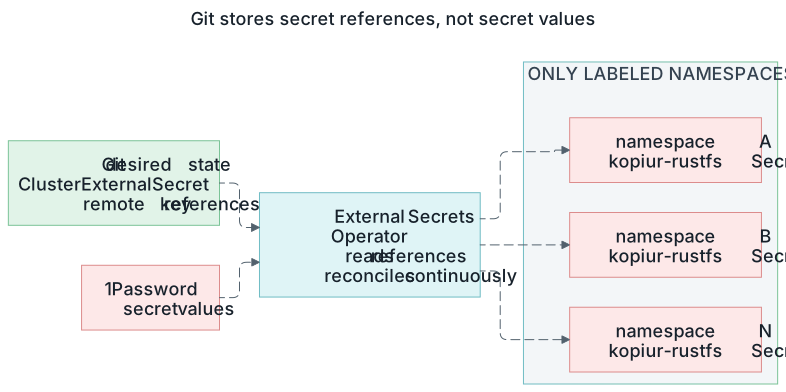
Git owns the references; 1Password owns the values; External Secrets owns the namespace copies. Open the full-size credential-flow diagram.
This cluster uses RustFS (an S3-compatible object store) running off-cluster at
192.168.10.133:30292. Any S3 works — MinIO, TrueNAS S3, Garage, Backblaze B2 — only the endpoint and credentials change.
The credential flow¶
 1Password item: rustfs
 (kopia_password · accessKey · secretKey)
        │
        ▼
 External Secrets Operator
        │
        ▼
 ClusterExternalSecret  kopiur-rustfs
        │ Secret copy         │ Secret copy
        ▼                     ▼
 namespace A            namespace B
 (repo=cluster-kopia)   (repo=cluster-kopia)
        │                     │
        └────────┬────────────┘
                 ▼
        kopiur mover Jobs
                 │ kopia
                 ▼
        RustFS S3  (bucket: kopiur)
One credential, stored once, materialized automatically into every namespace that opts in. Apps never carry S3 config.
The pieces (all in infrastructure/backup/kopiur/)¶
| File | Resource | What it sets up |
|---|---|---|
clusterrepository.yaml |
ClusterRepository cluster-kopia |
the kopia repo → RustFS s3://kopiur |
externalsecret.yaml |
ClusterExternalSecret kopiur-rustfs |
fans the repo creds into labeled namespaces |
volumesnapshotclass.yaml |
VolumeSnapshotClass longhorn-snapclass |
how CSI snapshots are taken (kopiur copyMethod: Snapshot) |
namespace.yaml |
Namespace kopiur-system |
operator + managed Maintenance + cluster creds live here |
This is the GitOps-managed config for kopiur — not the operator itself, which
is the Helm Application at core-dependencies/kopiur-operator-app.yaml.
One-time setup steps¶
1. The S3 side — RustFS on TrueNAS¶
The S3 store must live outside the cluster — the whole point is that it
survives the cluster. Here it's RustFS
running as a TrueNAS app on the NAS (S3 API endpoint
192.168.10.133:30292; the console is on :30293 — point Kubernetes at the
API port, not the console).
- Install the RustFS app on TrueNAS; its app/root credentials exist only for bootstrap and console administration — never point Kubernetes at the root key.
- In the RustFS console, create the buckets:
kopiur— the Kopia repository for kopiur (this doc; the repo lives at the bucket root,prefix: "")postgres-backups— retired CNPG/Barman bucket, aging out via lifecycle policy- Create one workload access key (named
homelab-workload) for all Kubernetes S3 clients, with its allow policy scoped to those buckets — exact IAM policy JSON and the root-vs-workload rationale: RustFS credential runbook. The workload key MUST have read/write on thekopiurbucket — if the policy only scopes it to other buckets, widen it, or theClusterRepositorycreate/connect fails. - Register & verify the key works before you ever rely on it — see the rules below.
2. The secret side (1Password → ESO)¶
One item, rustfs, in the homelab-prod vault (full field list incl. the
admin-only root keys: credential runbook):
| Field | Used as |
|---|---|
kopia_password |
KOPIA_PASSWORD — encrypts every backup; lose this, lose the backups |
rustfs-workload-access-key |
AWS_ACCESS_KEY_ID |
rustfs-workload-secret-key |
AWS_SECRET_ACCESS_KEY |
root-access-key / root-secret-key |
TrueNAS app admin only — never used by workloads |
3. The repository CR (in Git, already done)¶
infrastructure/backup/kopiur/clusterrepository.yaml declares the repo as a
first-class CR. The shape that matters:
apiVersion: kopiur.home-operations.com/v1alpha1
kind: ClusterRepository
metadata:
  name: cluster-kopia
spec:
  backend:
    s3:
      bucket: kopiur
      prefix: ""                       # dedicated bucket — repo at the root
      endpoint: 192.168.10.133:30292   # BARE host:port, no scheme/trailing slash
      region: us-east-1
      tls:
        disableTls: true               # RustFS is plain HTTP (LAN-only)
      auth:
        secretRef: { name: kopiur-rustfs, namespace: kopiur-system }
  encryption:
    passwordSecretRef: { name: kopiur-rustfs, namespace: kopiur-system, key: KOPIA_PASSWORD }
  create:
    enabled: true                      # fresh repo at the bucket root
  allowedNamespaces:
    selector:
      matchLabels:
        kopiur.home-operations.com/repo: cluster-kopia
Notes that bite if you get them wrong:
- The endpoint is a bare host:port — no http://, no trailing slash.
- TLS-off plain-HTTP RustFS is tls.disableTls: true.
- A cluster-scoped secretRef must carry an explicit namespace
(webhook-enforced).
- allowedNamespaces.selector is label-driven tenancy: any namespace labeled
kopiur.home-operations.com/repo: cluster-kopia may use this repo. The
same label drives the credential fan-out below, so onboarding an app is
one namespace label.
4. The credential fan-out (in Git, already done)¶
infrastructure/backup/kopiur/externalsecret.yaml is ONE
ClusterExternalSecret kopiur-rustfs that materializes the kopiur-rustfs
Secret into every namespace labeled kopiur.home-operations.com/repo:
cluster-kopia (the consumer namespaces and kopiur-system itself, which
needs the creds for the controller connection and the managed Maintenance):
# the Secret each labeled namespace receives (kopiur-rustfs)
KOPIA_PASSWORD:        <from 1Password: kopia_password>
AWS_ACCESS_KEY_ID:     <from 1Password: rustfs-workload-access-key>
AWS_SECRET_ACCESS_KEY: <from 1Password: rustfs-workload-secret-key>
The endpoint/bucket/TLS settings are not in this Secret — they live on the
ClusterRepository CR. The Secret only carries creds + the kopia password.
The Secret NAME must equal the
ClusterRepository'sauth.secretRef.name/encryption.passwordSecretRef.name(kopiur-rustfs) and carry the well-known keys (KOPIA_PASSWORD/AWS_ACCESS_KEY_ID/AWS_SECRET_ACCESS_KEY). This is the "without credential projection" path: ESO delivers the creds (least-privilege) instead of granting the operator cluster-wide secrets-write RBAC.
Label the namespace, get the Secret. No per-app credential plumbing, ever.
5. The snapshot class¶
infrastructure/backup/kopiur/volumesnapshotclass.yaml ships
VolumeSnapshotClass longhorn-snapclass (driver driver.longhorn.io, the
cluster-default snapshot class). kopiur's copyMethod: Snapshot references it by
name, so every backup depends on it.
6. Fail-closed behavior¶
On a restore-before-bind, if the repo is unreachable, kopiur raises a
backend error before it reaches the "no snapshot → bind empty" decision, so
the PVC stays Pending and never binds an empty volume. There is no separate
admission gate to maintain. Full flow:
kopiur backup architecture §4 (restore-before-bind).
Verifying the backend¶
# the repository CR is healthy (operator connected/created the repo):
kubectl get clusterrepository cluster-kopia -o wide

# the Secret fans out to a labeled namespace:
kubectl get secret kopiur-rustfs -n <ns>

# the endpoint is reachable from the cluster:
nc -zw5 192.168.10.133 30292 && echo OK

# any completed mover proves auth end-to-end:
kubectl get snapshot -A
Operational rules¶
- Register the access key on the S3 server, then verify before any destructive rebuild. An unregistered external credential blocks all recovery even with perfect Git state — the DR pre-nuke checklist checks this for you.
- Confirm the workload key has read/write on the
kopiurbucket. A policy scoped to another bucket lets everything else look healthy while theClusterRepositoryfails to create/connect. - The Kopia password is the single blast radius. One shared repo, one password, every backup encrypted with it. Keep it only in 1Password; acceptable on a LAN, see known limitations.
- Rotation: the per-step rotation procedure (new key on RustFS → update 1Password → force ESO refresh → restart env-var consumers) lives in the credential runbook.