Run Postgres in this cluster — the plain-English guide¶
Purpose: everything a junior Kubernetes operator needs to run, check,
restore, and change a Postgres database in this cluster without fighting
GitOps.
Status: current truth. This is the only database pattern in the
cluster (plain Postgres + kopiur, default since 2026-07-09; the last two
CloudNativePG databases were retired 2026-08-13 in a data-zero cutover).
Scope: day-to-day operations and recovery. Creating a brand-new database
is covered by the migration/pattern doc and the
/project:new-database command — this page links there instead of repeating it.
TL;DR¶
Tip
- A database here is just an app: a Deployment running the official
postgresimage, a Service, a PVC, and a small backup stub. No operator, no StatefulSet, no magic. - Git is the only control panel. ArgoCD notices your commit and makes
the cluster match.
kubectl editgets silently reverted within minutes. - kopiur snapshots the database volume every hour to S3. If the PVC is ever recreated, it refills itself from the newest snapshot before the pod starts ("restore-before-bind"). Worst case you lose ≤1 hour of data.
- A PVC stuck
Pendingafter a rebuild is usually the restore working, not broken. Read the Pending section before touching anything. - Rolling back a database to its last snapshot = delete two objects and let ArgoCD recreate them. Full steps below.
The mental model (read this once, slowly)¶
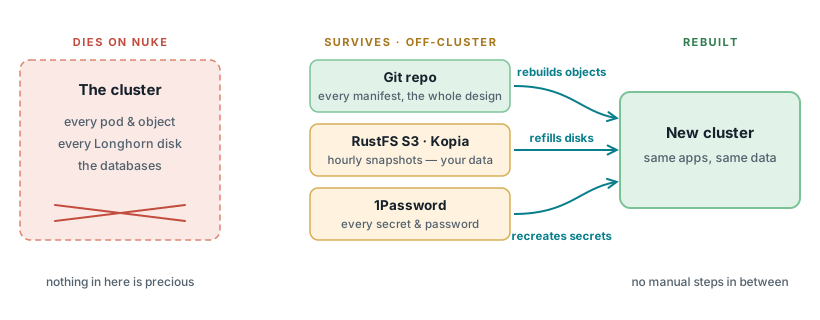
Everything inside the cluster is disposable because everything it needs to rebuild itself lives outside it. Open the full-size lifecycle diagram.
DIES ON NUKE                 SURVIVES (off-cluster)          REBUILT
--------------               ----------------------          -------
The cluster                  Git repo          ── rebuilds objects ──┐
  every pod & object         RustFS S3 (Kopia) ── refills disks   ──┤→ New cluster
  every Longhorn disk        1Password         ── recreates secrets ┘  same apps,
  the databases                                                        same data
Three loops run all the time. Understand them and every weird behavior in this page makes sense:
LOOP 1 — ArgoCD (every ~3 min, or on git push)
  "Does the cluster match Git?"  If not → make it match.
  This includes re-creating things you deleted and reverting things you edited.

LOOP 2 — kopiur backup (daily cron per database; 6-hourly if irreplaceable)
  "Snapshot the PVC → upload to S3 (RustFS bucket)."
  Postgres is never stopped for this; the snapshot is crash-consistent,
  which Postgres is designed to recover from (it looks like a power cut).

LOOP 3 — kopiur restore-before-bind (only when a PVC is CREATED)
  New PVC appears → it does NOT bind empty. It waits (Pending) while kopiur
  downloads the newest snapshot into it, THEN binds with data, THEN the
  Postgres pod starts and replays its write-ahead log like after a power loss.
The consequence that makes GitOps + databases easier here, not harder: deleting things is the recovery mechanism. You never restore by hand. You delete the broken object, ArgoCD recreates it from Git, and loop 3 refills the data. The whole cluster rebuild works the same way.
Where the pieces live (gitea is the reference — copy it, don't invent):
| Piece | File (reference) | What it is |
|---|---|---|
| The database | my-apps/development/gitea/postgres/deployment.yaml |
Plain postgres:18.x Deployment, Recreate strategy, runs as uid 999 |
| The address apps use | my-apps/development/gitea/postgres/service.yaml |
gitea-postgres.gitea.svc.cluster.local:5432 |
| The disk | my-apps/development/gitea/postgres/pvc.yaml |
Longhorn PVC whose dataSourceRef points at the kopiur Restore |
| The backup contract | my-apps/development/gitea/kopiur/gitea-postgres-data.yaml |
SnapshotPolicy (daily) + SnapshotSchedule + Restore |
| The password | 1Password → ExternalSecret → gitea-db-secret |
Never in Git. See rotation gotcha |
To create a new database, follow
plain-postgres-migration.md § "The pattern" or
run /project:new-database <app>. Don't hand-roll the four files.
Daily driving: is my database healthy?¶
All read-only. Run these before believing anything is broken (gitea shown — substitute your namespace/app):
# 1. Pod running and ready?
kubectl -n gitea get pod -l app=gitea-postgres
# EXPECT: 2/2 Running (postgres + metrics exporter), restarts not climbing

# 2. Disk bound and not full?
kubectl -n gitea get pvc gitea-postgres-data
# EXPECT: Bound

# 3. Backups actually happening? (THE most important check)
kubectl -n gitea get snapshot
# EXPECT: newest Snapshot age < 1h, phase Succeeded, non-zero files.
# A database whose newest snapshot is a day old has a broken safety net —
# fix that BEFORE it matters, see kopiur architecture doc.

# 4. Talk to the database directly (troubleshooting only, changes nothing):
kubectl -n gitea exec -it deploy/gitea-postgres -c postgres -- \
  psql -U gitea -d gitea -c 'select version();'
For trends, use Grafana: the postgres exporter sidecar (see Metrics) publishes connection counts, database size, and long-running-query gauges for every database that carries it.
The GitOps gotchas (why your instinct is wrong here)¶
These are the five things that bite people coming from kubectl-driven or
managed-database worlds. Each one exists for a reason.
Gotcha 1 — kubectl edit doesn't stick¶
my-apps Applications run with self-heal on: ArgoCD reverts any live edit —
including kubectl scale --replicas=0 — usually within a few minutes. This is
a feature: it means the cluster can always be rebuilt from Git alone.
Instead: change the YAML in Git, push, and let ArgoCD sync. For "I need the DB down NOW" situations, see the restore ladder below — the runbooks there are designed to work with self-heal, not against it.
Gotcha 2 — every database change causes a short outage (on purpose)¶
The Deployment uses strategy: Recreate: the old pod fully stops before the
new one starts. With a ReadWriteOnce disk that's mandatory — RollingUpdate
would try to attach one disk to two pods and deadlock forever
(Multi-Attach error, pod stuck ContainerCreating).
Never "fix" the brief downtime by switching to RollingUpdate. Expect ~30–60 seconds of database unavailability on any image bump or config change; the apps reconnect on their own.
Gotcha 3 — version bumps: minors are free, majors are a project¶
Renovate auto-bumps postgres:18.3 → 18.4 (safe, data format unchanged).
A major bump (18 → 19) is different: Postgres data directories are not
major-version compatible, and merging one crashloops the pod on its old data
dir (this actually happened — PR #1621, 17→18). Majors are therefore gated
behind manual approval in Renovate. If you're doing one on purpose: dump with
the old major's image first, wipe/reinit the data dir, restore. The exact
order is in the comment block at the top of the gitea postgres
deployment.yaml.
Gotcha 4 — the password lives in TWO places¶
The 1Password item feeds the Kubernetes Secret, but Postgres also stores the password inside its own data — and the in-data copy wins. The env vars only matter on the very first boot of an empty volume. Two traps follow:
- Changing the 1Password item alone does not change the database password —
it just makes the app present a wrong password. Rotation is a sequence:
ALTER ROLE ... WITH PASSWORDinside psql first, then update 1Password, then restart consumers. Full order: plain-postgres-migration.md § credential state. - After a restore, the database has the password from snapshot time. If
someone rotated since the snapshot, the app will get auth errors until you
re-run the
ALTER ROLEwith the current 1Password value.
Gotcha 5 — the PVC's weird annotations are load-bearing¶
The database PVC carries argocd.argoproj.io/compare-options /
sync-options annotations and a dataSourceRef. A PVC's dataSourceRef is
immutable after creation, and those annotations stop ArgoCD from endlessly
trying (and failing) to "fix" that immutable field. Symptoms of removing them:
the app shows a permanent ComparisonError or forever-OutOfSync PVC. Leave
them alone; an OutOfSync-looking PVC that is Bound and working is fine.
A Pending PVC is usually good news¶
When a database PVC is (re)created, it sits Pending while kopiur downloads
the newest snapshot into it. This is the restore working. Small DBs take
under a minute; big ones take as long as the download takes.
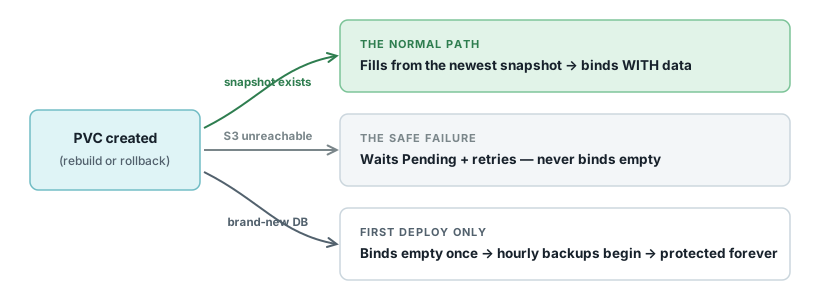
The invariant to remember: an outage delays a restore — it can never fake one. "Empty after rebuild" requires a reachable repo with no snapshot, which only describes a database that never existed before. Open the full-size decision diagram.
PVC created ──┬─ snapshot exists  → fills from newest snapshot → binds WITH data
              ├─ S3 unreachable   → waits Pending + retries — NEVER binds empty
              └─ brand-new DB     → binds empty once → scheduled backups begin
# Watch the hydration:
kubectl -n <ns> get restore <pvc-name>-restore
kubectl -n <ns> get events --sort-by=.lastTimestamp | tail -20
Only two outcomes are possible, both safe:
- Snapshot exists → PVC binds with the data in it. Postgres then boots and replays its journal (the startup probe allows ~5 minutes for this — do not "help" by killing a pod that's starting slowly).
- Backup repo unreachable (NAS down, S3 creds broken) → the PVC stays Pending forever rather than binding empty. This is deliberate: an outage can never silently give you a blank database. Fix the repo, the restore proceeds.
The only case where a new PVC binds empty: a genuinely brand-new database that has never had a snapshot. That's the intended first-deploy path.
The restore ladder (start at level 0, escalate only if needed)¶
Level 0 — pod crashed, node rebooted, OOM-kill¶
Do nothing. Kubernetes restarts the pod, Postgres replays its
write-ahead log exactly like after a power cut, and comes back consistent.
Data loss: none. Your only job is patience and maybe
kubectl -n <ns> get events if it recurs.
Level 1 — database is up but the app can't reach it¶
This is a plumbing problem, not a data problem — do not restore anything.
Check in order: Secret in sync (kubectl -n <ns> get externalsecret), Service
name the app is pointing at, and whether someone rotated the password without
the ALTER ROLE step (gotcha 4).
Level 2 — roll the database back to the last snapshot¶
For: bad migration, corrupted data, "the app wrote garbage for the last 20 minutes and I want the 10 a.m. state back."
This discards data — check what you're rolling back to first
Everything written after the newest snapshot is gone (daily schedule ⇒ up to a day; 6-hourly ⇒ up to 6 hours). Confirm the newest snapshot's age and size before deleting anything:
Point-in-time recovery ("2:37 p.m. exactly") does not exist on this pattern — that's the trade-off we accepted vs CNPG. Last snapshot is the only stop.The runbook — no ArgoCD pausing needed; self-heal is the engine that does the work (this is the same mechanic the weekly restore-canary drill exercises):
NS=gitea; APP=gitea-postgres; PVC=gitea-postgres-data

# 1. Don't bother scaling the app to 0 — self-heal puts it back. It doesn't
#    matter: the app will error while its database is gone (expected) and
#    anything it writes in the meantime dies with the old volume anyway.

# 2. Delete the pinned Restore CR. A Restore remembers ("pins") the snapshot
#    it used the first time — deleting it is what makes the recreate pull the
#    NEWEST snapshot instead of the ancient pinned one.
kubectl -n $NS delete restore $PVC-restore

# 3. Delete the PVC, then the postgres pod holding it (the PVC finalizer
#    waits for the pod; deleting the pod releases it).
kubectl -n $NS delete pvc $PVC --wait=false
kubectl -n $NS delete pod -l app=$APP

# 4. Let ArgoCD do the restore: self-heal notices the missing Restore + PVC
#    and recreates both from Git; the new PVC hydrates from the newest
#    snapshot; the new postgres pod starts on the restored data.
#    Impatient? Click SYNC on the my-apps-<app> Application in the ArgoCD UI.
kubectl -n $NS get pvc,restore,pod -w
# EXPECT within a few minutes: Restore recreated → PVC Pending → PVC Bound →
# postgres pod 2/2 Running.
Finish: once postgres is Running, bounce the app so it reconnects
cleanly instead of nursing dead connections:
kubectl -n $NS delete pod -l <app's pod label>.
Verify: psql in (health check #4 above), confirm the data state matches the snapshot time, and confirm the app works. If it goes sideways: nothing here is unrecoverable — the snapshots in S3 are untouched by all of the above; re-running the same steps retries the restore.
Level 3 — the whole namespace is wrecked¶
Delete the namespace. Seriously — this is the proven DR drill (karakeep,
2026-06-27): kubectl delete namespace <ns> → ArgoCD recreates everything
from Git (CreateNamespace=true) → every backed-up PVC in it hydrates
from its newest snapshot. Same warning as level 2: all PVCs in the namespace
roll back to their last snapshots.
Level 4 — the whole cluster is gone¶
Not your call solo — but the database part is the easy part: databases need zero special steps in a cluster rebuild. Bootstrap runs, ArgoCD deploys everything, PVCs hydrate, Postgres recovers. The full runbook (pre-nuke checklist included) is docs/disaster-recovery.md.
What happened to CloudNativePG?¶
Retired 2026-08-13. gitea and immich migrated with their data; paperless and temporal were cut over as fresh empty databases (a deliberate data-zero decision during a cluster rebuild — their old Barman buckets are aging out via the RustFS lifecycle policy). If you find CNPG instructions anywhere, they're history — this page is the pattern. Full story: plain-postgres-migration.md.
Metrics: seeing inside the database¶
Each plain-Postgres deployment can carry a tiny postgres-exporter sidecar
that publishes database internals to Prometheus/Grafana. Reference
implementation: my-apps/development/gitea/postgres/ (sidecar in the
Deployment + metrics port on the Service + servicemonitor.yaml). Copy those
three pieces for any other database.
What to actually look at, and why:
| Metric | Question it answers |
|---|---|
pg_stat_activity_count vs pg_settings_max_connections |
"Are we running out of connections?" — the classic silent DB killer. Sustained >80% means an app is leaking connections. |
pg_database_size_bytes |
"Will the PVC fill up?" — trend this; resize the PVC in Git before it's urgent. |
pg_stat_activity_max_tx_duration |
"Is something stuck?" — a transaction open for minutes usually means a hung migration or a lock pile-up. |
pg_up |
"Can the exporter even reach Postgres?" — if 0, the DB or its password is the problem, not the metrics. |
The never-do list¶
- Never
RollingUpdateon the database Deployment (gotcha 2). - Never merge a Postgres major version bump casually (gotcha 3).
- Never rotate the password by editing 1Password alone (gotcha 4).
- Never remove the PVC's compare/sync annotations or
dataSourceRef(gotcha 5). - Never hand-create or hand-edit kopiur
SnapshotPolicy/SnapshotSchedule/Restoreobjects — they come from Git; deleting them (level 2) is the only sanctioned live interaction. - Never "fix" a
PendingPVC by removing itsdataSourceRefto make it bind empty. You'd be trading a delayed restore for permanent data loss.
Related¶
- Plain Postgres pattern + cutover runbook — creating/migrating a database
- kopiur backup architecture — how loops 2 and 3 work inside
- kopiur mover permissions — the uid/gid gotcha when adding backups
- Cluster disaster recovery runbook — levels 3–4 in full, restore canary