The easy guide — explain this cluster to anyone¶
The whole system — GitOps, sync waves, Kustomize components, kopiur backups, restore-before-bind DR — explained from zero, in order, with the real YAML.
Deep-dive companions: storage architecture (the operator's reference — design decisions, ops, troubleshooting), kopiur backup architecture (the mechanism), disaster recovery (the runbook).
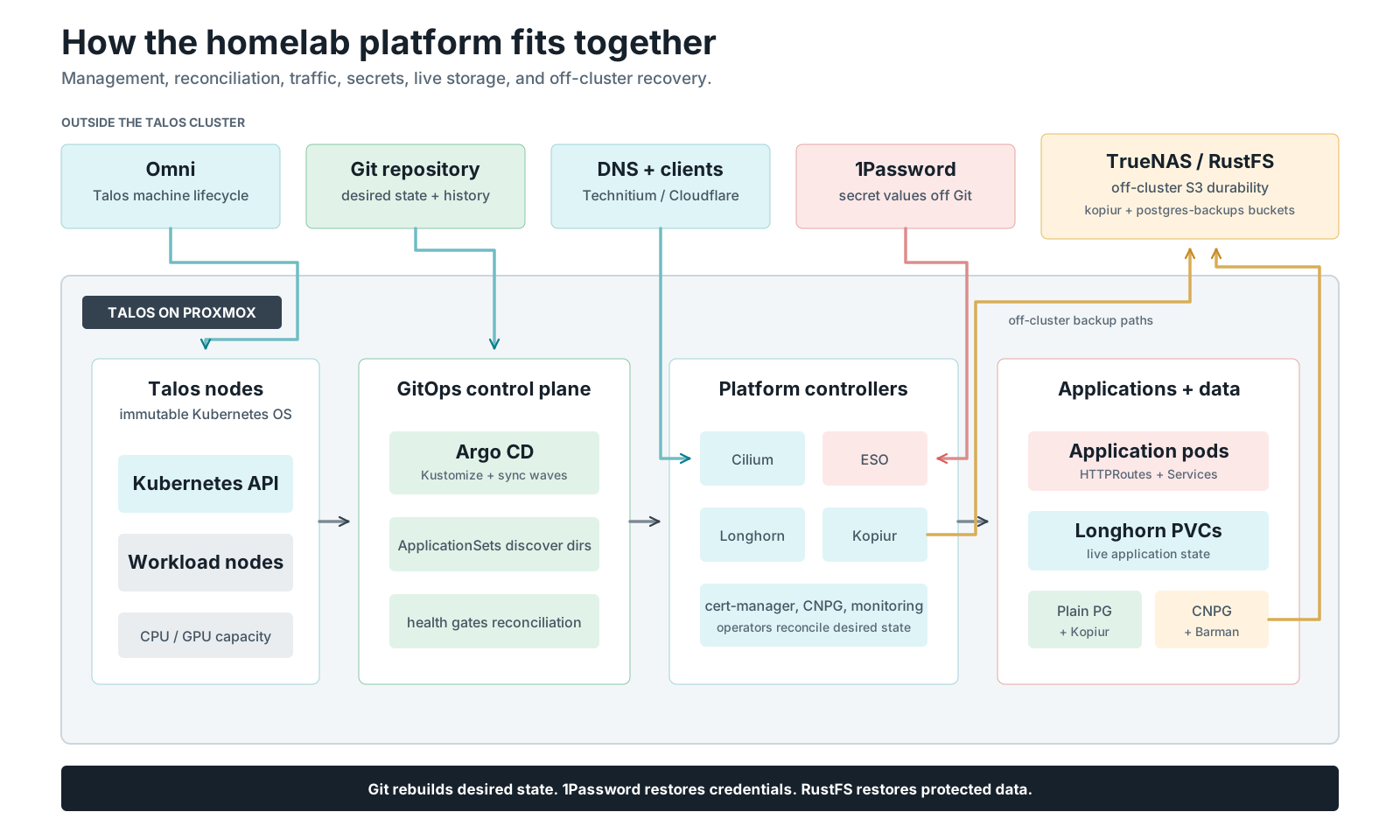
Git reconstructs desired state, 1Password reconstructs credentials, and RustFS reconstructs protected data. Open the platform map full size.
The 30-second pitch¶
Destroy the entire Kubernetes cluster — every node, every disk, every app — and rebuild it with one bootstrap script and a coffee. Every application comes back, with its data, in the right order, unattended. No restore scripts. No snapshot IDs. No "wait, which volume was that?"
Three ideas make that true, and they stack:
- GitOps — the entire cluster is a Git repo. A directory is an application.
- Sync waves — ArgoCD gates direct core dependencies, so the backup machinery exists before anything that needs it.
- Restore-before-bind — every important volume is recreated pre-filled with its backed-up data before its app is allowed to start.
The rest of this page walks each idea from zero.
Here because someone said “dude, you gotta try kopiur”?
You do not need the sync waves, ArgoCD, namespace labels, or Kustomize components to back up your PVCs. Those are the scaffolding this cluster uses at scale — kopiur's minimum is one operator and ~30 lines of YAML on any cluster with CSI snapshots. Jump straight to the adoption ladder and climb only as far as you need.
Part 0 — What has to exist first¶
This guide starts the moment you have a working Kubernetes cluster. Getting to that moment is a separate job, and it is worth being honest about it: there are three layers underneath everything below, and each one has to be standing before the next makes sense.
Proxmox        the hypervisor — actual machines with CPUs and disks
   ↓
Omni           the control plane that turns those machines into Talos nodes
   ↓
Talos          minimal Linux that runs only Kubernetes — no SSH, no shell
   ↓
[you are here] GitOps, sync waves, kopiur, DR
| Layer | What it is | Where it is set up |
|---|---|---|
| Proxmox | Your hypervisor. Two hosts here, but one is fine. | Your own hardware |
| Omni | Sidero's control plane. Provisions Talos, manages upgrades, hands you a kubeconfig. Runs as one Docker container — a Raspberry Pi 5 with an NVMe is plenty. | Omni setup guide |
| Proxmox infrastructure provider | The add-on that lets Omni create VMs for you instead of you building them by hand. One container per Proxmox host, one compose project. | proxmox-providers/ |
| Talos | The OS on the nodes. You never log into it — Omni and talosctl drive it through an API. |
Provisioned by Omni |
Do I need all of this to use the ideas on this page?
No. GitOps, sync waves, and kopiur are not Talos-specific or Omni-specific — they work on any Kubernetes cluster with CSI snapshot support. If you already have a cluster, skip straight to Part 1 and ignore the Proxmox/Omni layers entirely. They are simply how this particular cluster gets built, and they are what make "destroy everything and rebuild" a ten-minute operation rather than a weekend.
The three things that bite people¶
If you are building the Omni layer, these are the ones worth knowing before you start rather than after:
- Omni has no login of its own. There is no admin account and no password file — it authenticates entirely against an external identity provider (Auth0, SAML, or OIDC). Sort that out first; it is the step most likely to block you.
- Put etcd on an SSD or NVMe. Omni runs an embedded etcd that fsyncs
constantly. An SD card or USB stick will work for a while, then produce
apply entries took too long, then corrupt itself. This is the single most common way to end up with a broken Omni. - Back up
omni.ascoff the box, immediately. It is the GPG key that decrypts Omni's etcd. Lose it and every cluster Omni manages becomes unrecoverable — no reset, no support ticket. It is the one genuinely irreplaceable file in the whole stack.
The full walkthrough — certificates, GPG, config, first login, provider keys — is in the Omni setup guide, written for someone who has never done it before.
Part 1 — GitOps: a directory is an application¶
There are no hand-written ArgoCD Application manifests for apps in this
cluster. ApplicationSets scan the repo's directory structure and generate
the Applications:
my-apps/ai/open-webui/               →  ArgoCD Application "my-apps-open-webui"
infrastructure/storage/longhorn/     →  ArgoCD Application "longhorn"
infrastructure/networking/gateway/   →  ArgoCD Application "infrastructure-gateway"
monitoring/metrics/prometheus-stack/ →  ArgoCD Application "monitoring-prometheus-stack"
Deploying a new app = mkdir, add a kustomization.yaml, git push. That's
the entire deployment pipeline.
The chain that makes it self-managing:
bootstrap-argocd.sh (manual, once)
        |
        v
root Application (root.yaml)
        |
        v
argocd/apps/  (projects + AppSets + entrypoint Applications)
        |
        v
4 ApplicationSets  (infra, databases, monitoring, my-apps)
        |
        v
auto-discovered apps  (my-apps/*/* etc.)
The one manual act is applying root.yaml. From then on ArgoCD manages
everything — including its own Helm values and the ApplicationSets that
discover everything else. Git is the cluster; the cluster is a cache.
Part 2 — How Argo waits (sync waves)¶

Wave numbers order resources; health checks make each dependency gate wait. Open the sync-wave sequence full size.
A cluster rebuild has a brutal ordering problem: apps need volumes, volumes need the backup operator, the operator needs credentials, credentials need the secrets machinery, and everything needs a network. Deploy it all at once and you get retry soup.
ArgoCD solves this with one annotation:
Within one Application sync, lower waves must become Synced and Healthy before later waves proceed. The root orders direct child Applications this way. ApplicationSets generate independent Applications; creating an AppSet does not wait for every generated workload to become healthy.
This cluster's waves, and why each sits where it does:
| Wave | What | Why it must precede the next wave |
|---|---|---|
| 0 | Cilium (CNI), ArgoCD itself, 1Password Connect, External Secrets | No network → nothing schedules. No secrets engine → no credentials for anyone. |
| 1 | cert-manager, Longhorn, Snapshot Controller | Storage + the VolumeSnapshot CRDs the backup system snapshots with. |
| 2 | kopiur operator (CRDs + controller + webhook) | The volume populator must exist before any PVC references a Restore. |
| 3 | kopiur config (ClusterRepository, credential fanout, VolumeSnapshotClass) |
The repo definition + S3 creds must be live before movers run. |
| 4 | Infrastructure + database AppSets, KEDA, VPA, Temporal worker | The platform layer. Databases are ordinary apps — their PVCs restore like any other. |
| 5 | Monitoring AppSet (kube-prometheus-stack), OTEL operator | Observability is deliberately not a core dependency. |
| 6 | my-apps AppSet — every user app + its per-PVC backup CRs | By now, everything a restoring PVC needs already exists. |
Two implementation details make this actually work — both bite people who copy the pattern without them:
1. The Application health check. ArgoCD does not assess the health of
Application resources by default, which silently breaks wave-gating in
app-of-apps setups — parent apps consider children "healthy" the moment they
exist. Re-enable it in the ArgoCD values
(infrastructure/controllers/argocd/values.yaml):
resource.customizations.health.argoproj.io_Application: |
  hs = {}
  hs.status = "Progressing"
  if obj.status ~= nil and obj.status.health ~= nil then
    hs.status = obj.status.health.status
  end
  return hs
This Lua check lets a parent wait on the health of direct child Applications. It does not aggregate ApplicationSet descendants. Built-in health checks for Deployments and other Kubernetes resources remain separate.
2. Restore-before-bind gates the app that needs the volume. During a
rebuild, a restoring PVC stays Pending (see Part 5). Its pod cannot start,
and its owning Application remains Progressing. Unrelated Applications
generated by an AppSet can continue reconciling:
A generated Application applies its resources
        |
        v
PVC created with dataSourceRef -> Restore
        |  (K8s withholds binding)
        v
PVC: Pending
        |
        v
kopiur populator mover Job hydrates volume from S3
        |
        v
PVC: Bound (with data)
        |
        v
Pod starts -> Ready
        |
        v
Application: Healthy — Argo's sync completes
Part 3 — Kustomize components (shared build-time patches)¶
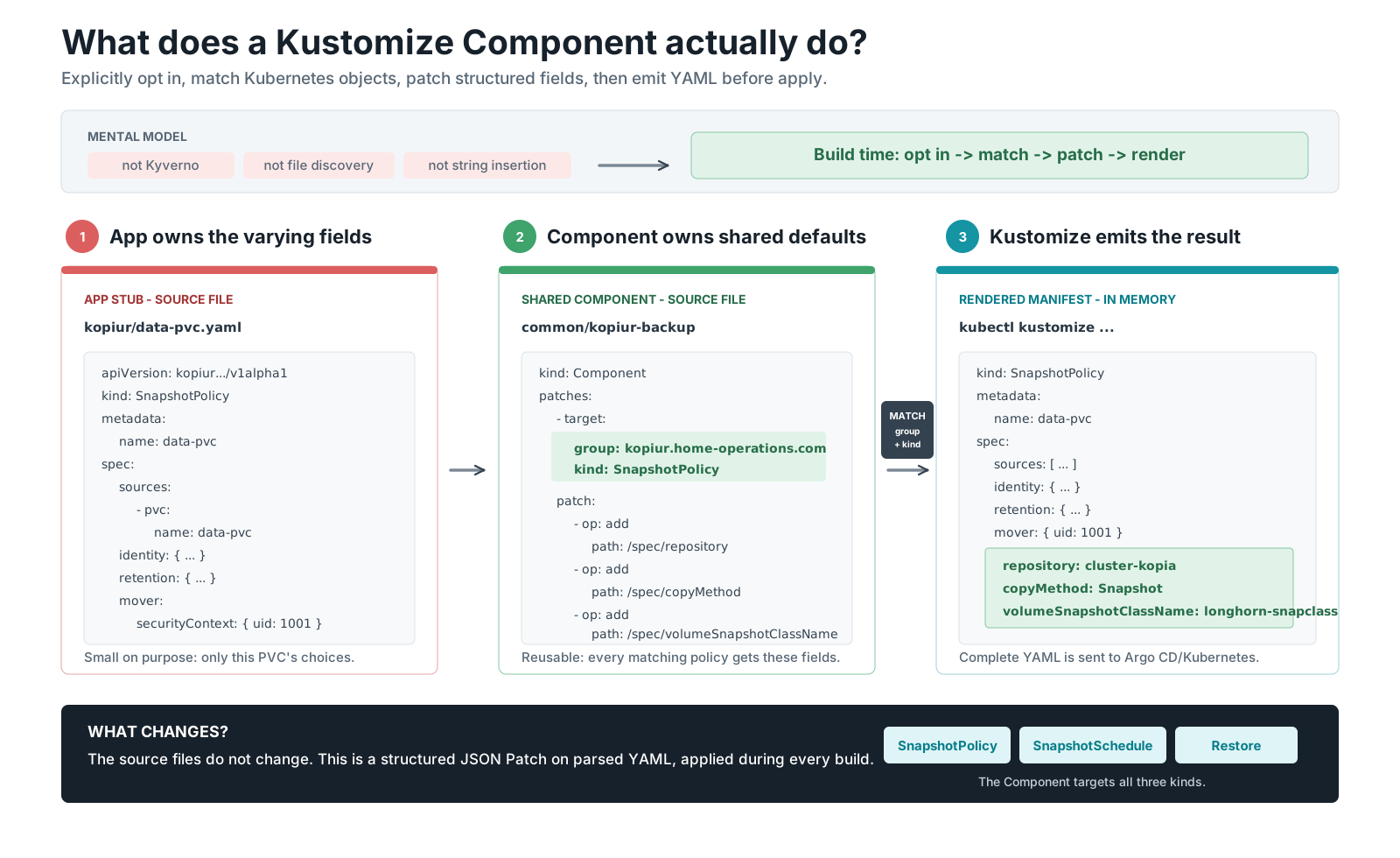
The app explicitly opts in, Kustomize patches matching objects during build, and Argo receives the complete rendered output. Open the Kustomize Component flow full size.
Classic Kustomize is base → overlay: an overlay inherits one base and patches it. That model breaks when you want to share one cross-cutting feature — "make this thing backed up" — across 20 unrelated apps that share no base.
A Component is an optional Kustomize package containing reusable resources
and patches. Nothing discovers it automatically. An application explicitly
opts in through components::
# my-apps/ai/open-webui/kustomization.yaml
components:
  - ../../common/kopiur-backup     # ← mix in "backed up"
resources:
  - kopiur/storage.yaml            # ← the app's tiny per-PVC stub
During kustomize build, Kustomize parses the application's resources, finds
objects matching each patch target by API group and kind, applies the JSON
Patch operations to exact field paths, and emits complete Kubernetes YAML.
Argo CD then diffs and applies that rendered output. The Component does not run
in the cluster, watch live resources, scan the repository for filenames, or
perform text replacement.
The division of labor is the whole design:
- The stub (per PVC, in the app's folder) carries only what varies: the PVC name, the backup identity, retention, the cron, and the mover's UID (see Part 6).
- The component (one shared file,
my-apps/common/kopiur-backup/) injects everything that's identical for every backup in the cluster.
The component is small enough to read in full — it's just JSON patches
targeted by resource kind:
# my-apps/common/kopiur-backup/kustomization.yaml (abridged)
apiVersion: kustomize.config.k8s.io/v1alpha1
kind: Component
patches:
  - target: { kind: SnapshotPolicy, group: kopiur.home-operations.com }
    patch: |
      - { op: add, path: /spec/copyMethod, value: Snapshot }
      - { op: add, path: /spec/volumeSnapshotClassName, value: longhorn-snapclass }
      - { op: add, path: /spec/repository, value: { kind: ClusterRepository, name: cluster-kopia } }
  - target: { kind: SnapshotSchedule, group: kopiur.home-operations.com }
    patch: |
      - { op: add, path: /spec/schedule/concurrencyPolicy, value: Forbid }
      - { op: add, path: /spec/schedule/runOnCreate, value: false }
  - target: { kind: Restore, group: kopiur.home-operations.com }
    patch: |
      - { op: add, path: /spec/repository, value: { kind: ClusterRepository, name: cluster-kopia } }
      - { op: add, path: /spec/target, value: { populator: {} } }
      - { op: add, path: /spec/policy, value: { onMissingSnapshot: Continue } }
At build time (kubectl kustomize my-apps/ai/open-webui) Kustomize merges
stub + component into complete CRs. Change the repo name or the snapshot class
once, in one file, and every backup in the cluster follows.
Why doesn't the component set the mover UID too? A component patches all resources of a kind identically, and the mover UID must match each PVC's data owner — which differs app to app (and even within one namespace). Uniform things go in the component; varying things stay in the stub. That line is the entire design discipline.
Part 4 — kopiur: the backup operator¶
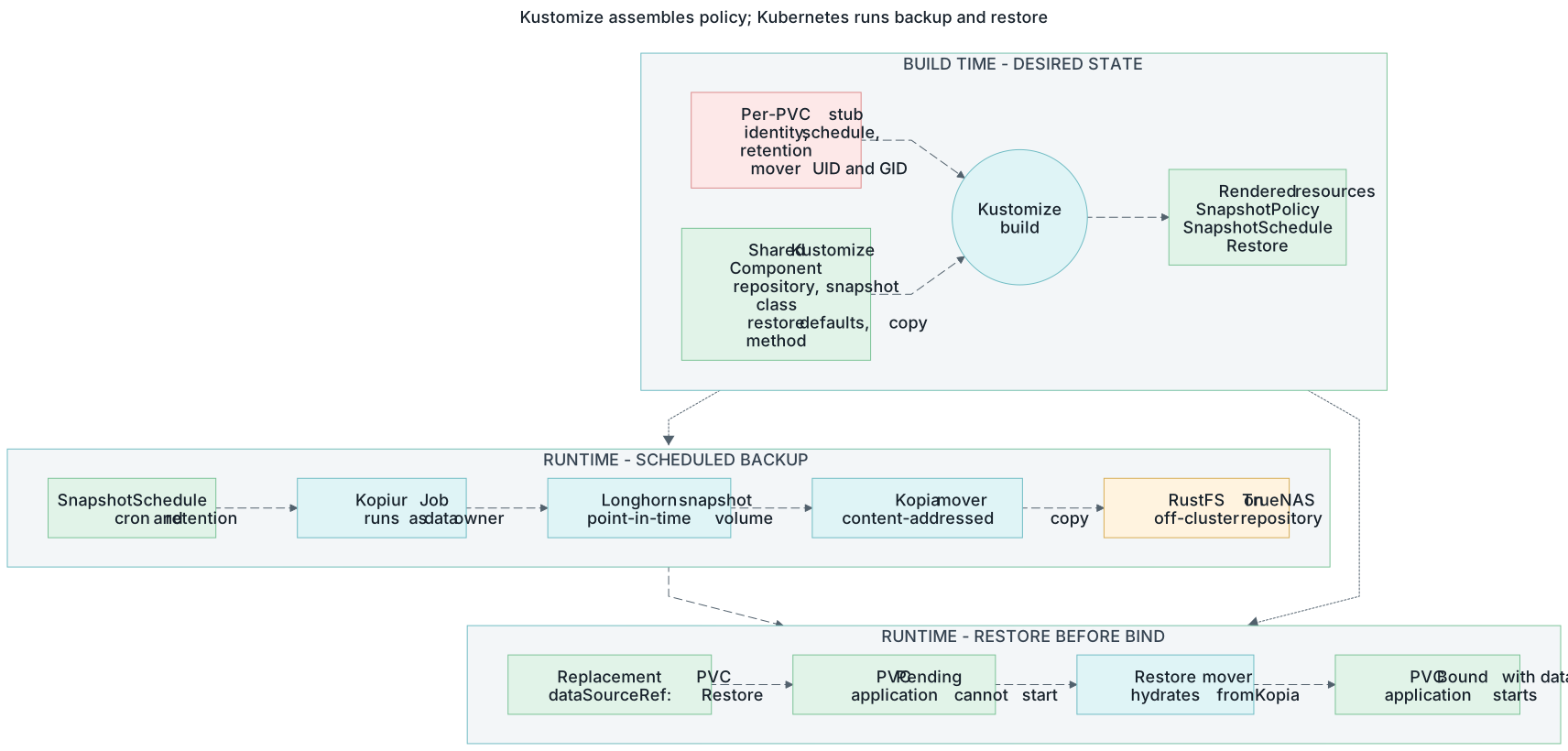
Build time declares the recovery contract; runtime moves the data and enforces restore-before-bind. Open the complete Kopiur flow full size.
kopiur is a Kopia-native Kubernetes operator (Rust). You declare small CRs; it runs Jobs; Kopia encrypts, deduplicates, and ships bytes to S3. The cast:
| CR | Scope | One-line job description |
|---|---|---|
ClusterRepository |
cluster | "The Kopia repo lives at RustFS s3://kopiur; namespaces with this label may use it." |
SnapshotPolicy |
per PVC | "Back up this PVC, under this identity, keep this much history, run the mover as this user." |
SnapshotSchedule |
per PVC | "Fire the policy on this cron." |
Snapshot |
created per run | One backup execution; ends Succeeded with file/byte counts. |
Restore |
per PVC | "I can rebuild this volume from the repo" — the thing a PVC's dataSourceRef points at. |
Plus one non-CR trick: the credential fanout. A single
ClusterExternalSecret copies the repo credentials (from 1Password, via
External Secrets) into every namespace labeled
kopiur.home-operations.com/repo: cluster-kopia. The same label is the
repo's tenancy allow-list. So opting a namespace into backups is one label.
What a scheduled backup actually does¶
SnapshotSchedule cron fires
        |
        v
Snapshot CR created
        |
        v
kopiur operator
        |  (1) CSI VolumeSnapshot (Longhorn, point-in-time)
        |  (2) mover Job (runs AS the data owner)
        v
CSI snapshot --(mounted read-only)--> mover Job
        |
        v  kopia: encrypt + dedup
RustFS S3  (s3://kopiur)
Point-in-time consistency comes from the CSI snapshot (the mover reads a frozen copy, not the live volume). Efficiency comes from Kopia's content-defined chunking: unchanged data uploads in near-zero time and takes near-zero new space, across all apps sharing the one repo.
The complete real example (open-webui)¶
This is the entire backup configuration for a production volume — four small touches, all in Git (click through the tabs):
One label opts the namespace in — it drives both the credential fanout and the repo's tenancy allow-list:
The restore pointer (Part 5 explains why this one stanza is the magic):
Only the varying bits — the component injects everything uniform:
apiVersion: kopiur.home-operations.com/v1alpha1
kind: SnapshotPolicy
metadata: { name: storage, namespace: open-webui }
spec:
  sources: [{ pvc: { name: storage } }]
  identity: { username: storage, hostname: open-webui }
  retention: { keepDaily: 14, keepWeekly: 6, keepMonthly: 3 }
  mover:   # runs as the DATA OWNER — Part 6
    securityContext: { runAsUser: 568, runAsGroup: 568, runAsNonRoot: true }
    podSecurityContext: { fsGroup: 568, supplementalGroups: [568] }
---
apiVersion: kopiur.home-operations.com/v1alpha1
kind: SnapshotSchedule
metadata: { name: storage-daily, namespace: open-webui }
spec:
  policyRef: { name: storage }
  schedule: { cron: "5 3 * * *" }   # distinct minute per PVC — no 3 a.m. stampede
---
apiVersion: kopiur.home-operations.com/v1alpha1
kind: Restore
metadata: { name: storage-restore, namespace: open-webui }
spec:
  source: { fromPolicy: { name: storage, offset: 0 } }   # offset 0 = latest
  mover:
    securityContext: { runAsUser: 568, runAsGroup: 568, runAsNonRoot: true }
    podSecurityContext: { fsGroup: 568, supplementalGroups: [568] }
Verify any time:
kubectl -n open-webui get snapshotpolicy,snapshotschedule,restore,snapshot,pvc
kubectl -n open-webui get secret kopiur-rustfs   # creds arrived via the fanout
Part 5 — Restore-before-bind (the DR magic)¶
This is the load-bearing idea of the whole system, and the part worth slowing down for in any talk.
The problem with every "normal" backup tool: restore is a separate step after the app starts. On a rebuild, the PVC is recreated empty, the app boots on the empty volume, and now you're racing it:
- The app's own next scheduled backup snapshots the empty state — and retention can age out your real data.
- The app writes new state to the blank volume — restoring the old data now loses the new writes and desyncs from external systems.
- Auth-bearing apps lock you out: the credential you'd log in with lived in the data you lost.
Sharpest version: a game-server world save. Fresh world boots, players join, and the "backup" system dutifully backs up the fresh world over your real one.
The fix is a first-class Kubernetes contract — the volume populator.
A PVC whose dataSourceRef points at a populator CR is withheld from
binding until the populator fills it:
That one stanza changes the failure mode completely. When the PVC is created — first install, rebuild, or "oops, I deleted it" — exactly one of three things happens:
| Repo state | Outcome |
|---|---|
| ✅ Reachable, snapshot exists | Mover restores the latest snapshot → PVC binds with data → app starts. |
| ⚪ Reachable, no snapshot yet | onMissingSnapshot: Continue → binds empty, starts backing up forward. Day-zero and disaster-day are the same code path. |
| 🛑 Unreachable | Populator errors and retries → PVC stays Pending. It never binds empty over a dead backend. |
That last row is the safety property everything else is built around: an outage can delay recovery, but it can never silently hand your app a blank volume that then gets backed up as if it were real.
Try it yourself, no cluster needed
The kopiur playground is an interactive simulation of exactly this state machine — delete the PVC, take S3 offline, nuke the cluster, and watch all three outcomes play out.
The honest fine print: a PVC without the dataSourceRef recreates empty —
the backup exists, but nothing tells Kubernetes to use it. CI
(validate-kopiur-coverage.py) hard-fails a PR where a backed-up PVC is
missing its dataSourceRef, and volumes that are deliberately unprotected
carry a backup-exempt label with a written reason. Everything is a recorded
decision.
Among Kubernetes backup tools, only populator-based tools implement this populator-hold. Velero, K8up, Stash & co. back up fine — but restore as a separate imperative step, which reintroduces the exact race above. That's why this cluster runs kopiur. (Full comparison.)
Part 6 — The one gotcha: the mover runs as the data owner¶
If you teach one operational lesson, teach this one — it's the #1 way a first backup fails on a hardened cluster.
The mover pod runs under Pod Security "baseline", which drops all Linux
capabilities — including the two (CAP_DAC_READ_SEARCH/CAP_DAC_OVERRIDE)
that let root ignore file permissions. So a root mover on this cluster is a
declawed root: uid 0, no master key. Point it at files owned by uid 568
with mode 600 and it gets PermissionDenied, every time.
The fix isn't to give the key back; it's to send the right user: run the mover as the uid:gid that owns the data.
# put it in the stub (both SnapshotPolicy and Restore)
mover:
  securityContext: { runAsUser: 568, runAsGroup: 568, runAsNonRoot: true }
  podSecurityContext: { fsGroup: 568, supplementalGroups: [568] }
This is also exactly why the UID lives in the per-PVC stub and not the
shared component: it's the one field that genuinely varies per volume.
Full detail, including the daemon-drop (mysql 999:568) and root-owned
(uid 0 + the privileged-movers namespace annotation) cases:
mover permissions.
Part 7 — Putting it together: the full DR story¶
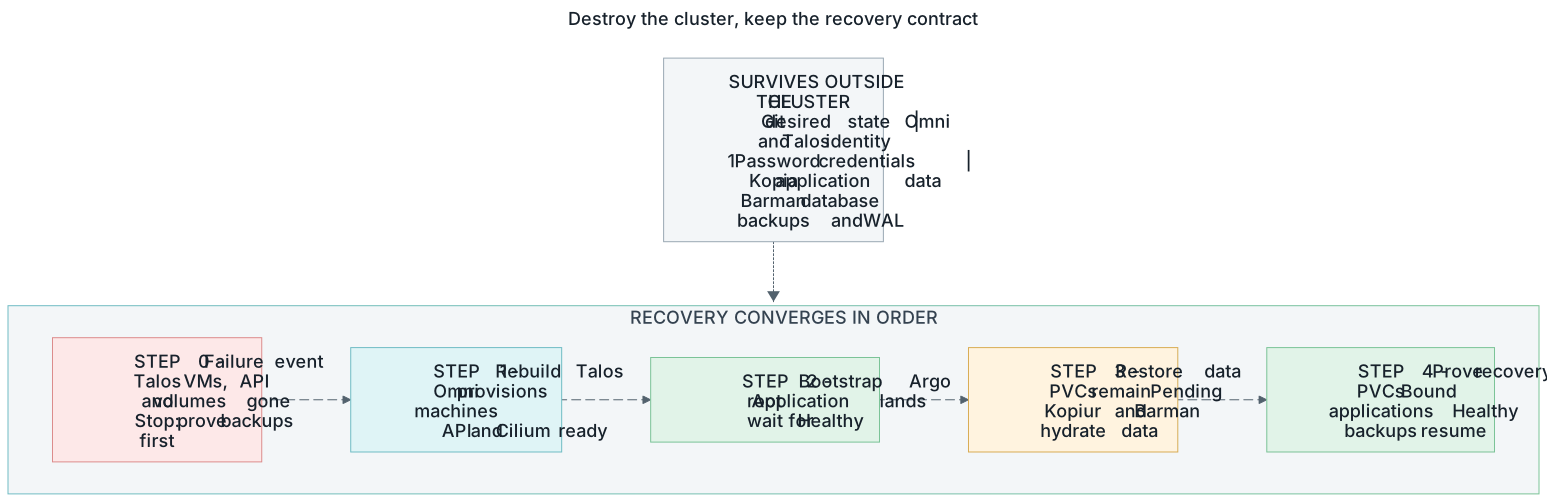
Recovery finishes only when desired state, credentials, protected data, and runtime health all converge. Open the disaster-recovery sequence full size.
Everything above composes into one sentence: the off-cluster pieces are the pets; the cluster is cattle.
Dies with the cluster:
  - Longhorn volumes
  - every Kubernetes object

Survives (off-cluster):
  - Git repo
  - Kopia repo — RustFS S3
  - 1Password vault
  - Omni/Talos machine config

  Survivors  --(bootstrap + sync waves)-->  New cluster
  New cluster  --(populators hydrate PVCs)-->  Everything back, with data
The rebuild, end to end:
omnictlprovisions fresh Talos VMs on Proxmox (machine classes + template)../scripts/bootstrap-argocd.shinstalls Argo and starts the dependency waves.- Waves 0–3 walk: network → secrets → storage → kopiur operator → repo config.
- App PVCs (databases included) hold
Pendingwhile kopiur hydrates them; apps start on restored data in parallel. - You drink the coffee.
A restore canary takes daily backups and runs weekly quick verification. Its isolated test PVC is where an operator can safely re-run the destructive delete→recreate→populate→byte-verify drill.
The honest boundaries:
- Database recovery is an explicit RPO choice — plain single-instance Postgres uses a single-volume crash-consistent kopiur snapshot (daily, or every 6 hours for irreplaceable data) and WAL crash recovery. There is no point-in-time recovery; the last snapshot is the only stop. That trade was accepted when CNPG was retired (2026-08-13).
- One repo copy, on-LAN — this is not 3-2-1; a NAS-level disaster loses the backups. Known, accepted, documented.
- RPO = the cron cadence. You lose at most one interval of data.
- kopiur is pre-1.0 — the chart is pinned; CRD fields can churn.
Part 8 — "I just want to try kopiur" (the adoption ladder)¶
The honest version of the colleague conversation:
"Dude, you gotta try kopiur." "OK… but to back up my PVCs I need your sync waves? ArgoCD? Namespace labels? Kustomize components??" "No. Those are what operating 22 backed-up PVCs unattended looks like. kopiur itself is an afternoon."
Everything in this repo is one of these rungs. Climb only as far as your problem actually demands:
| Rung | You add | It buys you | You need it when |
|---|---|---|---|
| 0 — backups | kopiur operator (Helm) + ClusterRepository + a plain Secret + one SnapshotPolicy/SnapshotSchedule |
Scheduled, encrypted, deduped PVC backups. kubectl only. |
You have ≥1 PVC you'd cry about. |
| 1 — self-restoring PVCs | a Restore CR + dataSourceRef on the PVC |
Restore-before-bind: a recreated PVC comes back with data, never silently empty. | The first time you delete a PVC on purpose or by accident. |
| 2 — GitOps | ArgoCD/Flux owning the manifests | Unattended recreate: delete the app, the namespace, whatever — Git puts it back and the restore fires itself. | You stop wanting to type kubectl apply during incidents. |
| 3 — credential fanout | the namespace label + ClusterExternalSecret (or any secret sync) |
New namespace = one label; repo creds appear, tenancy granted. No per-app secret plumbing. | Backed-up apps live in more than ~3 namespaces. |
| 4 — the component | common/kopiur-backup Kustomize component |
Per-PVC config shrinks to a ~20-line stub; cluster-wide backup policy changes in one file. | You're copy-pasting the same CR fields a 5th time. |
| 5 — sync waves | wave annotations + the Application health Lua | A whole-cluster rebuild that orders itself: storage → operator → repo → apps, restores gating each app's start. | You want "nuke it and re-bootstrap" as a supported operation. |
| 6 — trust at scale | CI coverage check + the restore canary | A PR can't ship a backed-up PVC missing its dataSourceRef; backup verification is scheduled and destructive restore drills have an isolated target. |
The system must stay correct without risking production data. |
Rung 0–1 on YOUR cluster, concretely¶
Prerequisites: any CSI with VolumeSnapshot support (kubectl get
volumesnapshotclass returns something) and any S3 endpoint (MinIO, Garage,
B2, TrueNAS…).
- Install the operator: the OCI Helm chart
oci://ghcr.io/home-operations/charts/kopiur(pin the version — it's pre-1.0). - Create a
kopiur-systemSecret withAWS_ACCESS_KEY_ID,AWS_SECRET_ACCESS_KEY,KOPIA_PASSWORD— plainkubectl create secretis fine; ESO is a rung-3 luxury. - Declare the repo: a
ClusterRepositorypointing at your bucket (barehost:portendpoint,tls.disableTls: truefor plain HTTP), withallowedNamespacesmatching a label of your choosing. Copy the shape from backup-repository-setup.md. - Label your app's namespace, copy the same Secret into it, and drop in the three CRs from Part 4's tab 3 — remembering the one real gotcha: the mover's UID must be the data owner's (Part 6).
- Watch
kubectl -n <ns> get snapshotreachCompleted. That's rung 0. - Add the
Restore+dataSourceRef(tabs 2–3), then drill it: scale to zero, delete the PVC, recreate it, watch it holdPendingand bind with your data. That's rung 1 — and the moment the whole idea clicks.
What's genuinely this repo vs. genuinely kopiur
kopiur gives you rungs 0–1 (the CRs, the populator, the mover). Rungs 2–6 are ordinary Kubernetes/GitOps building blocks — ArgoCD, ESO, Kustomize, CI — arranged so the backup system needs zero human choreography. None of them are required to start; all of them are why the full-cluster-nuke story works unattended.
FAQ (the questions colleagues actually ask)¶
Why not Velero? Velero restores as a separate step after the PVC exists — which reintroduces the blank-volume race from Part 5. Only populator-based tools can hold the PVC hostage until the data is back.
Why kopiur?
Kopia-native with first-class CRs (ClusterRepository instead of hand-rolled
secrets-per-namespace), a lean mover, the volume-populator contract for
restore-before-bind, and an active home-operations community.
(Evaluation record.)
Why explicit per-PVC CRs instead of "just label the PVC"?
dataSourceRef is immutable and must exist at PVC create time — a
controller reacting to a label is too late (the PVC already bound empty).
So the wiring must live in Git at render time; the Kustomize component keeps
that from becoming boilerplate.
One shared repo for all apps — isn't that risky?
One encryption password is a single blast radius, accepted for a single-operator
LAN-only homelab. In exchange, Kopia dedups across all apps. Snapshots are
namespaced by each policy's identity (hostname/username), so apps never
collide.
What happens if the S3 box is down during a rebuild?
Restores error and retry; PVCs stay Pending. Nothing binds empty. Recovery
is delayed, never corrupted. (Row 3 of the table in Part 5.)
What about the databases? Same flow. Every database is a plain Postgres Deployment whose PVC follows the exact same restore-before-bind path as every other PVC (CNPG was retired 2026-08-13 — pattern + history). The operator's guide is run-postgres-plain-english.md.
How do I add a backup to a new app?
Six steps, ~5 minutes: find the data owner's uid:gid → label the namespace →
write the stub → add the dataSourceRef → wire the component → verify.
The checklist.
Cheat sheet¶
# Is everything wired? (per namespace)
kubectl -n <ns> get snapshotpolicy,snapshotschedule,restore,snapshot,pvc
kubectl -n <ns> get secret kopiur-rustfs

# Cluster-wide backup health
kubectl get snapshot -A                        # recent runs Completed?
kubectl -n kopiur-system get pods,clusterrepository
# Or the official CLI (0.5.1+): kubectl krew install kopiur && kubectl kopiur --help
# On-demand backup right now: kubectl kopiur snapshot now --policy <name> -n <ns>

# Sync-wave order at a glance
kubectl get applications -n argocd \
  -o custom-columns=NAME:.metadata.name,WAVE:.metadata.annotations.argocd\\.argoproj\\.io/sync-wave,STATUS:.status.sync.status

# Render what the component injects (no cluster needed)
kubectl kustomize my-apps/ai/open-webui
| I want to… | Go to |
|---|---|
| Operate it day-2 (design decisions, ops, troubleshooting) | storage-architecture.md |
| Add a backup | kopiur-backup-architecture.md §5 |
Fix PermissionDenied |
kopiur-mover-permissions.md |
| Rebuild the cluster | disaster-recovery.md |
| Set up the S3 backend | backup-repository-setup.md |