Technitium vanillax.me Split-DNS
Split-horizon DNS for vanillax.me is served by Technitium (192.168.10.15)
behind Firewalla. LAN clients get private records for internal services and fall
back to Cloudflare for public names:
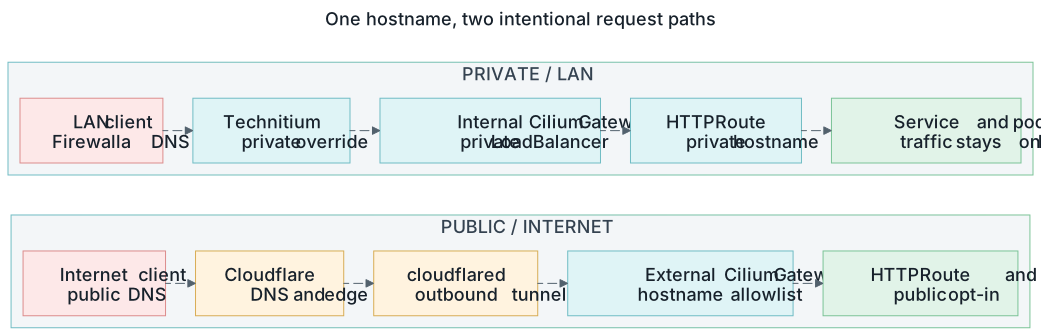
Private and public exposure are separate DNS, Gateway, and HTTPRoute choices. Open the full-size request-path diagram.
LAN client
  -> Firewalla DNS (192.168.10.1)
  -> vanillax.me forwarded to Technitium (192.168.10.15)
  -> local private record returned when present
  -> otherwise forwarded over DoH to Cloudflare
Technitium serves vanillax.me as a Conditional Forwarder zone, not a
Primary zone. An authoritative Primary zone returns NXDOMAIN for missing
records instead of falling back to Cloudflare — the Conditional Forwarder
returns local overrides when present and forwards everything else upstream.
Components
| Component | Responsibility |
|---|---|
| Firewalla | Client DNS endpoint and one vanillax.me zone forward to Technitium |
| Technitium | Private *.vanillax.me overrides and Cloudflare DoH fallback |
external-dns-technitium |
RFC2136 A/TXT records for private HTTPRoutes |
| Cloudflare ExternalDNS | Public records for gateway-external routes |
gateway-internal-technitium |
Private routes at 192.168.10.52 |
gateway-external |
Public Cloudflare routes at 192.168.10.49 |
Private HTTPRoutes parent to gateway-internal-technitium; public routes
parent to gateway-external.
1. The Conditional Forwarder Zone
In the Technitium web console:
- Open Zones.
- Select Add Zone.
- Set the zone name to
vanillax.me. - Select Conditional Forwarder Zone.
- Configure an HTTPS forwarder:
- Enable DNSSEC validation when the UI offers it.
- Save the zone.
The Cloudflare DoH forwarder avoids Firewalla's interception of plain DNS
traffic. Records stored locally in this zone override Cloudflare; missing
records are forwarded to Cloudflare. The parenthesized IP bootstraps the DoH
hostname — without it, Technitium cannot resolve cloudflare-dns.com when
recursion is disabled and returns SERVFAIL.
Verify public fallback directly through Technitium:
These return public Cloudflare addresses, not NXDOMAIN.
2. The TSIG Key
In Settings -> TSIG:
- Add key name
externaldns-vanillax. - Select
HMAC-SHA256. - Leave Shared Secret empty so Technitium generates a strong Base64 key.
- Save the settings.
Treat the generated key as a credential. Keep it out of Git, terminal history, screenshots, tickets, and chat.
3. The Secret In 1Password
The generated key lives in one 1Password item:
Item: external-dns-technitium-vanillax
Field: tsig-secret
Value: <exact Base64 value generated by Technitium>
The ExternalSecret passes this value through unchanged — do not Base64-encode it again.
4. RFC2136 Dynamic Updates
Open Zones -> vanillax.me -> Options -> Dynamic Updates (RFC 2136):
Dynamic Updates: Allow
Security Policy:
TSIG Key Name: externaldns-vanillax
Domain Name: *.vanillax.me
Allowed Record Types: A, AAAA, CNAME, TXT
The wildcard policy prevents the key from changing the zone apex and limits it to the record types ExternalDNS needs.
5. AXFR (Zone Transfer)
ExternalDNS uses AXFR to read existing records and TXT ownership state. Without
it, updates may succeed but ExternalDNS repeatedly resubmits the same records
and logs AXFR error: dns: bad xfr rcode: 5.
Open Zones -> vanillax.me -> Options -> Zone Transfer:
The populated TSIG list means transfers still require authentication even
though the transfer mode is Allow.
Both the RFC2136 update policy and the AXFR key list must live on the
vanillax.me Conditional Forwarder zone. Configuring them on any other zone
has no effect on this flow.
6. Firewalla Zone Forwarding
In Firewalla, one conditional-forwarding rule sends the whole zone to Technitium — no per-host overrides:
Domain: vanillax.me
DNS server: 192.168.10.15
Include subdomains: enabled
Scope: all LAN/VLAN networks that should use the homelab DNS view
Client DHCP/DNS stays pointed at Firewalla; clients are never pointed directly
at Technitium. Per-host GUI overrides (e.g. address=/homeassistant.vanillax.me/...)
must not exist — they shadow Technitium records and resolve private names to
the wrong endpoint.
Verification
Check the external-dns-technitium controller:
Steady-state message:
These messages indicate a broken TSIG/AXFR configuration:
Private records directly against Technitium — all return 192.168.10.52:
dig @192.168.10.15 argocd.vanillax.me A +short
dig @192.168.10.15 homeassistant.vanillax.me A +short
dig @192.168.10.15 grafana.vanillax.me A +short
dig @192.168.10.15 registry.vanillax.me A +short
Public fallback stays public:
dig @192.168.10.15 vanillax.me A +short
dig @192.168.10.15 news.vanillax.me A +short
dig @192.168.10.15 search.vanillax.me A +short
Through the client DNS path (Firewalla):
dig @192.168.10.1 argocd.vanillax.me A +short    # 192.168.10.52
dig @192.168.10.1 homeassistant.vanillax.me A +short   # 192.168.10.52
dig @192.168.10.1 vanillax.me A +short           # public Cloudflare
dig @192.168.10.1 news.vanillax.me A +short      # public Cloudflare
TLS and application routing:
curl -fsS -o /dev/null -w '%{http_code} %{remote_ip}\n' https://argocd.vanillax.me/
curl -fsS -o /dev/null -w '%{http_code} %{remote_ip}\n' https://homeassistant.vanillax.me/
Private endpoints connect to 192.168.10.52 with valid TLS.
Operational Notes
- TSIG secret rotation requires a pod restart. The secret is injected as
the env var
EXTERNAL_DNS_RFC2136_TSIG_SECRETviasecretKeyRefat pod start; updating the K8s Secret does not hot-reload it. After ESO rewrites the Secret, restart the deployment:
-
The TSIG key name and secret bytes must match. ExternalDNS signs RFC2136 updates with key name
externaldns-vanillaxand the secret bytes delivered by ESO from theexternal-dns-technitium-vanillax1Password item. A name/byte mismatch returnsdns: bad authenticationon both UPDATE and AXFR. -
HTTPRoute parentRefs ignore rule. In
infrastructure/controllers/argocd/values.yaml, ignore only the defaultedgroup/kindsubfields — never the wholeparentRefsarray or whole entries:
name/namespace/sectionName must stay diffable so route re-parenting is
applied.
TLS Certificate Architecture
Both gateways share one publicly-trusted wildcard certificate — no separate internal cert:
| Resource | Value |
|---|---|
| ClusterIssuer | cloudflare-cluster-issuer (ACME DNS-01 via Cloudflare) |
| Certificate / Secret | cert-vanillax in namespace gateway, SAN *.vanillax.me |
gateway-external (192.168.10.49) |
certificateRefs: cert-vanillax |
gateway-internal-technitium (192.168.10.52) |
certificateRefs: cert-vanillax |
Public and private paths use the same hostname under *.vanillax.me, so the
same Let's Encrypt wildcard validates on both. TLS authenticates the name,
not the IP, so a publicly-trusted cert served from a private 192.168.10.52
endpoint is fully valid with no browser warnings. cert-manager renews
cert-vanillax via DNS-01 against the public Cloudflare zone regardless of
where the gateway is reachable.