Plain Postgres + kopiur: the CNPG exit ramp
Decision (2026-07-09): new databases run as plain Postgres Deployments backed up by kopiur, and the CNPG databases migrate to that pattern one at a time. Completed 2026-08-13: all four databases migrated and CNPG (operator, Barman plugin, recovery script, manual sync gates) was deleted from the repo. The idle Crunchy PGO operator was removed 2026-07-09.
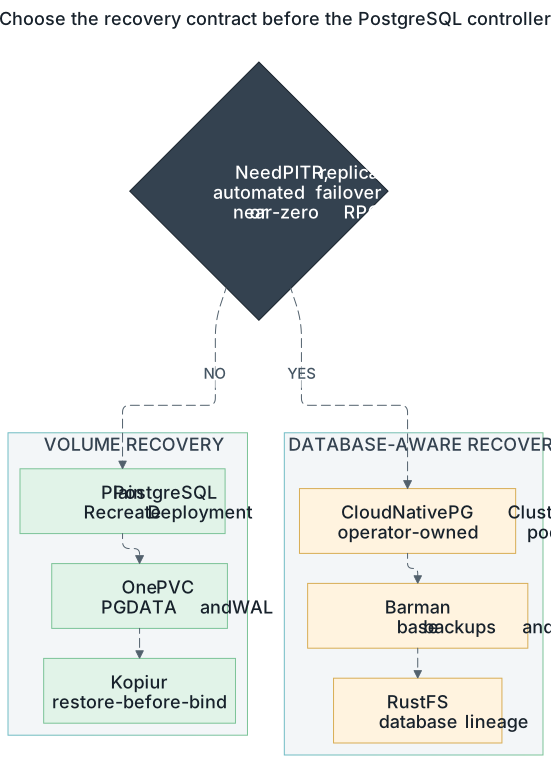
The deployed path is plain Postgres plus Kopiur. PITR and database-level automatic failover would require a separate design; CNPG is retired here. Open the full-size PostgreSQL decision diagram.
Why
CNPG's DR flow is intrinsically multi-commit: bootstrap: is creation-time
only (git must say initdb or recovery before the cluster exists) and a
recovered cluster must archive WAL to a new serverName lineage. That means
every cluster nuke needs the overlay flip + a post-recovery lineage-bump
commit, plus the rustfs-lifecycle bookkeeping for abandoned lineages. The
kopiur pattern needs zero commits: nuke, bootstrap, the PVC hydrates via
restore-before-bind, Postgres WAL-recovers like a power loss, done — the same
DR story as the other protected application PVCs.
The trade, stated honestly: restores land on the last snapshot (daily
tier targets daily snapshots, 6h for irreplaceable data; failures can make the recoverable point older), not any point in time. No replicas/failover (single pod,
Recreate). Postgres major upgrades become a manual dump/restore (minors
and patches stay Renovate-automated).
The pattern (reference: my-apps/development/gitea/postgres/)
The Postgres twin of my-apps/knowledge/project-nomad/mysql/ — four pieces inside
the owning app's directory:
| Piece | Key points |
|---|---|
postgres/deployment.yaml |
postgres:<MAJOR.MINOR> pinned; Recreate; uid/gid/fsGroup 999; PGDATA subdir; POSTGRES_DB/POSTGRES_USER/POSTGRES_PASSWORD env declare the database on first (empty-volume) boot — no admin tool; --data-checksums; pg_isready startup/readiness/liveness probes; 60s termination grace |
postgres/service.yaml |
named port postgres/5432 |
postgres/pvc.yaml |
longhorn + dataSourceRef → the kopiur Restore + the two masking annotations |
kopiur/<app>-postgres-data.yaml |
stub with mover 999:999, daily retention tier (keepDaily: 7, keepWeekly: 4), distinct cron minute |
Consistency model: kopiur's CSI VolumeSnapshot is crash-consistent
(point-in-time, single volume). Postgres is designed to recover from exactly
that — WAL replay on boot, as after a power cut. --data-checksums makes any
torn-page corruption loudly detectable instead of silent.
The startup probe deliberately allows roughly five minutes before liveness can restart the container. A large restored database may need a longer budget; size it from observed recovery time, not from the normal empty-start time.
Credential state after restore
The official image's POSTGRES_* initialization variables only act on an
empty data directory. A kopiur restore therefore brings back the database role
password that existed at snapshot time; changing only the 1Password item does
not change that role and can lock the application out after either rotation or
restore.
Treat password rotation as a coordinated stateful operation: authenticate with
the current password, execute ALTER ROLE <role> WITH PASSWORD '<new>', update
the 1Password item immediately, let External Secrets reconcile, restart the
consumers, and verify them before discarding the old credential. Do not place
the password or SQL command in Git or shell history.
Per-app cutover runbook (~15 min, one app at a time)
Deploying the manifests creates an empty Postgres beside the running CNPG cluster; nothing changes for the app until step 4. Gitea shown; adjust names.
- Merge the manifests, let ArgoCD sync. Verify the instance is up and the backup plumbing exists:
- Stop writers: scale the app to 0 (
kubectl -n gitea scale deploy gitea --replicas=0). - Copy the data (CNPG primary → new instance; password prompts read from
the same secret both sides already use):
kubectl -n cloudnative-pg exec gitea-database-1 -- \ pg_dump -U gitea -d gitea -Fc -f /tmp/gitea.dump kubectl -n cloudnative-pg cp gitea-database-1:/tmp/gitea.dump /tmp/gitea.dump kubectl -n gitea cp /tmp/gitea.dump \ $(kubectl -n gitea get pod -l app=gitea-postgres -o name | cut -d/ -f2):/tmp/gitea.dump kubectl -n gitea exec deploy/gitea-postgres -- \ pg_restore -U gitea -d gitea --no-owner --role=gitea /tmp/gitea.dump - Repoint the app — one commit: change the DB host in the app's config
(gitea:
values.yamlgitea.config.database.HOST→gitea-postgres.gitea.svc.cluster.local:5432). Sync; scale the app back up; verify it works. - Seed the first backup and verify (do NOT skip — restore-before-bind is only as good as the newest snapshot):
- Retire the CNPG cluster — delete
infrastructure/database/cloudnative-pg/gitea/and its entry anywhere it's referenced; add itsserverNamelineages to the rustfs lifecycle expiration ConfigMap (infrastructure/backup/rustfs-lifecycle/) as an abandoned lineage.
Full-retirement checklist (after the last DB migrates)
- gitea migrated (2026-07-10: dump/restore verified 112 tables / 5 repos / 2 users; first populated kopiur snapshot confirmed; CNPG cluster deleted, v9/v10 lineages added to rustfs lifecycle)
- temporal migrated (2026-08-13) — greenfield data-zero cutover during the
cluster rebuild: fresh empty databases (
temporal+temporal_visibilityvia an initdb script), workflow history deliberately discarded. Postgres pinned to 17 until Temporal upstream declares PG18 support. The postgres stack carries sync-waves (-3/-2) because the chart's schema Jobs are wave -1 Sync hooks and waves block — seemy-apps/development-infra/temporal/postgres/deployment.yaml. - paperless migrated (2026-08-13) — greenfield data-zero cutover, same rebuild. Document originals live on the kopiur-backed media/data PVCs; DB-side tags/metadata start fresh (re-consume to re-import).
- immich migrated (2026-08-03) — no dump/restore was needed: every CNPG
lineage back to v1 held zero users and zero assets, so the cutover was a
greenfield empty database. Uses
ghcr.io/immich-app/postgres(not stockpostgres— immich requires thevchordextension, preloaded by that image); pinned to the17-vectorchord0.4.3major the CNPG cluster ran. Photo files live on the separatelibraryPVC. - delete
infrastructure/database/cloudnative-pg/(operator, global secrets, per-DB dirs) andcustom-entrypoints/cnpg-barman-plugin-app.yaml(+ its entry inapps/kustomization.yaml) — done 2026-08-13, along withscripts/bootstrap-cnpg-recovery.shand the AppSet manual-sync gates - retire the postgres-backups rustfs lifecycle ConfigMap once the barman buckets age out
- scrub CNPG rules from CLAUDE.md / infrastructure/database/CLAUDE.md and
update
docs/domains/cnpg/+ the DR runbook's database section (2026-08-13; the CNPG explainer/DR/beginner docs were pruned — git history retains them)
The one open item is retiring the postgres-backups lifecycle ConfigMap once
the abandoned Barman buckets age out (60-day expiration rules cover every
lineage as of 2026-08-13).